<?xml version="1.0" encoding="utf-8"?><feed xmlns="http://www.w3.org/2005/Atom" ><generator uri="https://jekyllrb.com/" version="3.10.0">Jekyll</generator><link href="https://dorothydingzx.github.io/atom.xml" rel="self" type="application/atom+xml" /><link href="https://dorothydingzx.github.io/" rel="alternate" type="text/html" /><updated>2026-10-29T19:09:27+00:00</updated><id>https://dorothydingzx.github.io/atom.xml</id><title type="html">Dorothy’s little world</title><subtitle>Recording research, sharing life, embracing the world</subtitle><author><name>Dorothy</name></author><entry><title type="html">Flow over a cylinder with ANSYS Fluent</title><link href="https://dorothydingzx.github.io/archives/flow-over-a-cylinder-with-ansys-fluent.html" rel="alternate" type="text/html" title="Flow over a cylinder with ANSYS Fluent" /><published>2020-04-16T04:12:33+00:00</published><updated>2020-04-16T04:12:33+00:00</updated><id>https://dorothydingzx.github.io/archives/flow-over-a-cylinder-with-ansys-fluent</id><content type="html" xml:base="https://dorothydingzx.github.io/archives/flow-over-a-cylinder-with-ansys-fluent.html"><![CDATA[<p>I am currently learning ANSYS Fluent for my research. There are also many great YouTube videos about this. To inspire myself to keep learning and also to record part of life, I want to summarize the analysis results of transient flow over a cylinder in this post.</p>

<!-- more -->

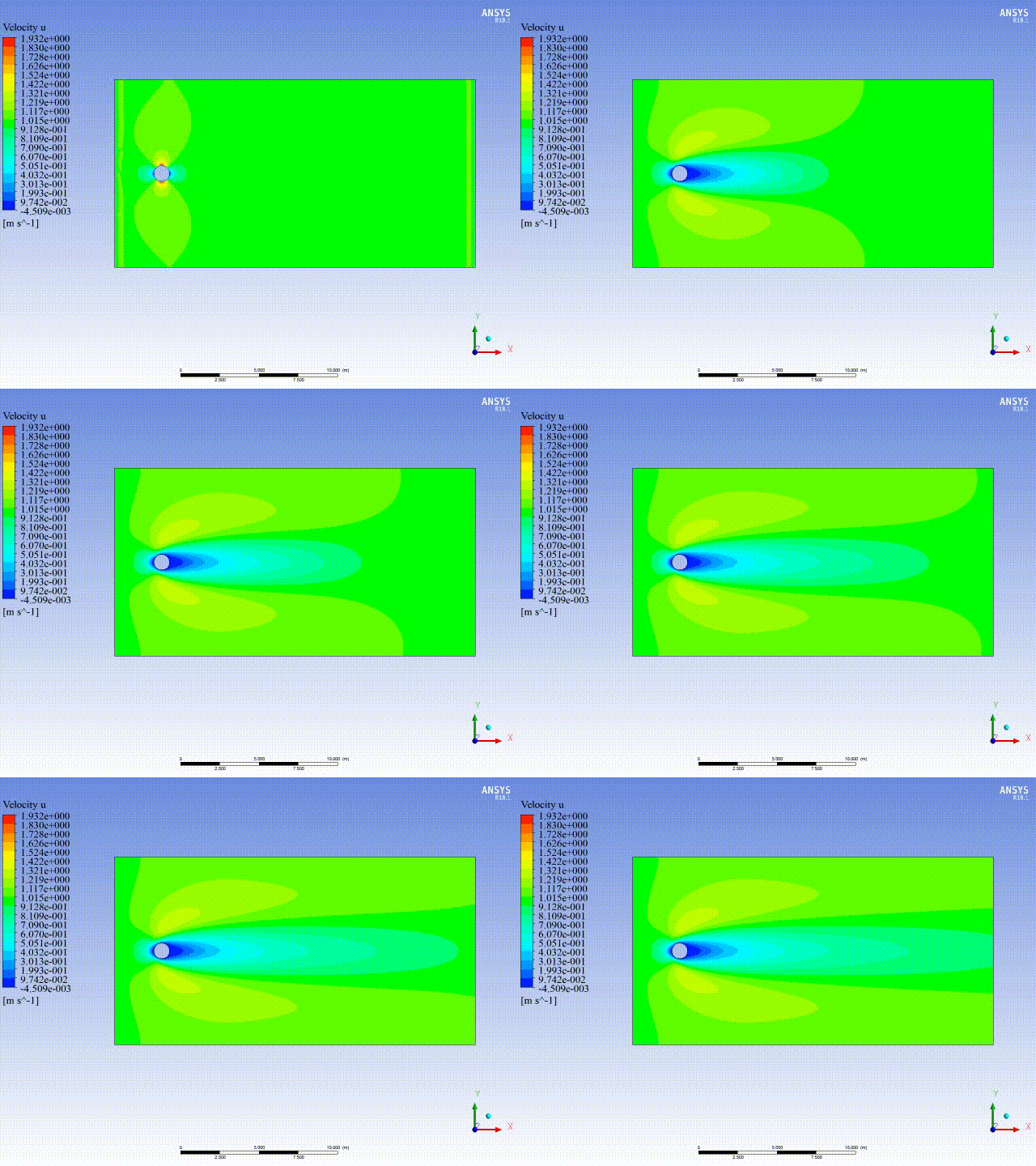
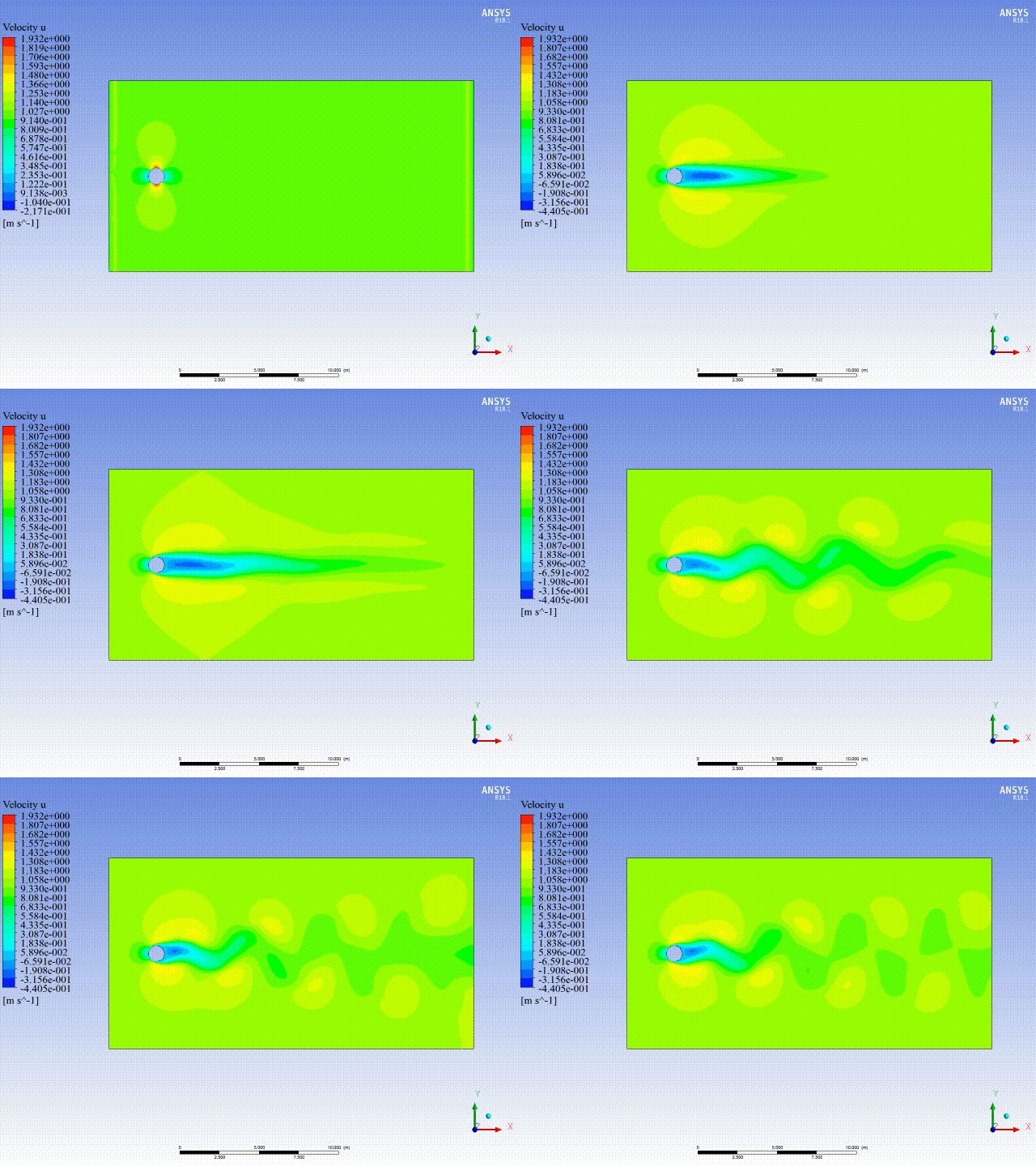
<p>To capture the famous Von Karman Street, and also to understand why the flow at low Reynolds number could be considered as steady, the Reynolds number 10 and 100 are adopted in transient analysis. A great YouTube video for you to better understand the theory, the link is <a href="https://www.youtube.com/watch?v=aS3wr7H6i2E&amp;list=PLKSR9A4mJH5o_5uNywi684Y0KstwIV0iQ&amp;index=3">here</a>.</p>

<p>Case 1: Re = 10</p>

<p><img src="/uploads/images/2020/2020-04-16-flow-over-a-cylinder-with-ansys-fluent-1.gif" alt="" width="640" /></p>

<p>Case 2: Re = 100</p>

<p><img src="/uploads/images/2020/2020-04-16-flow-over-a-cylinder-with-ansys-fluent-2.gif" alt="" width="640" /></p>

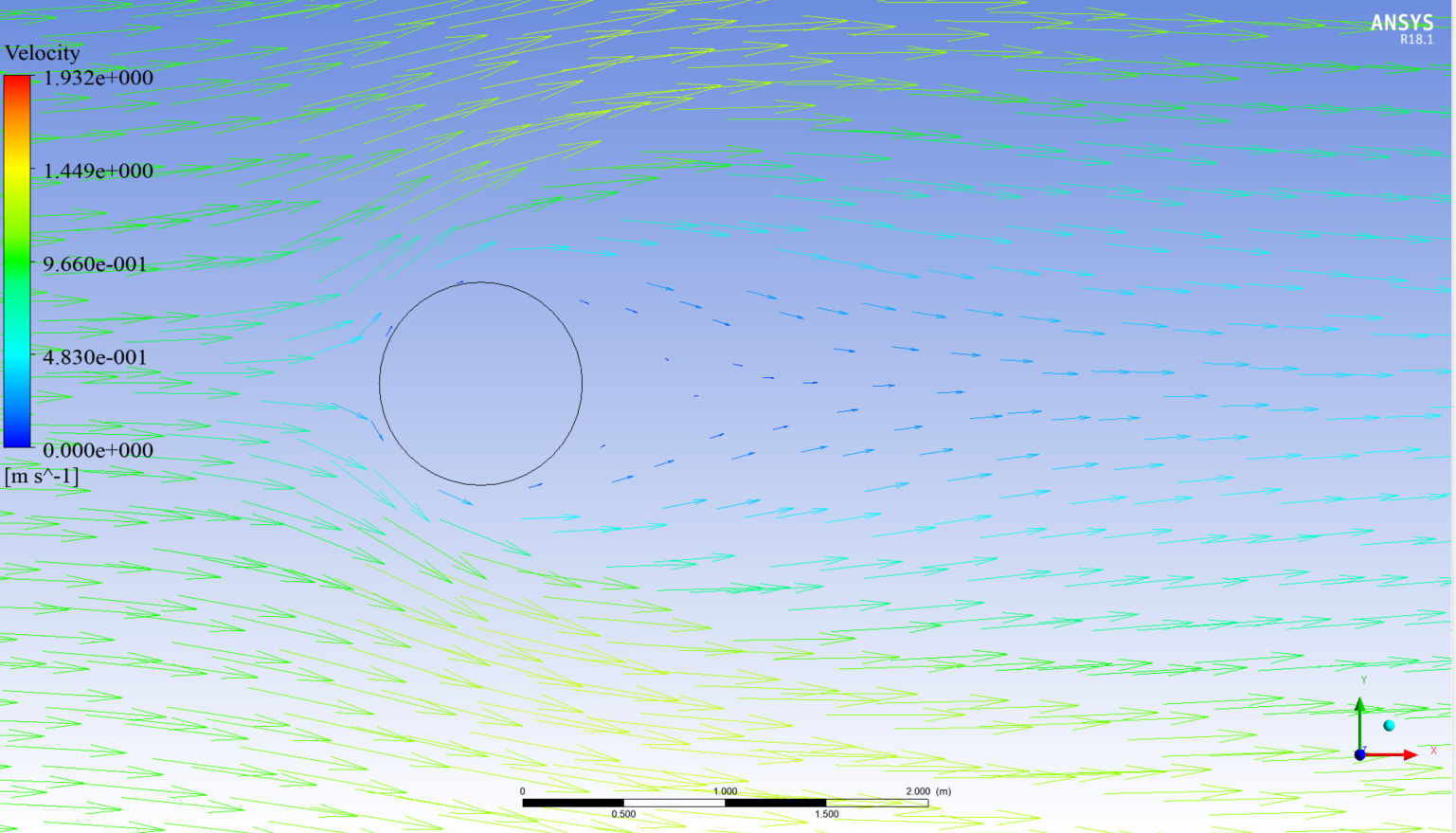
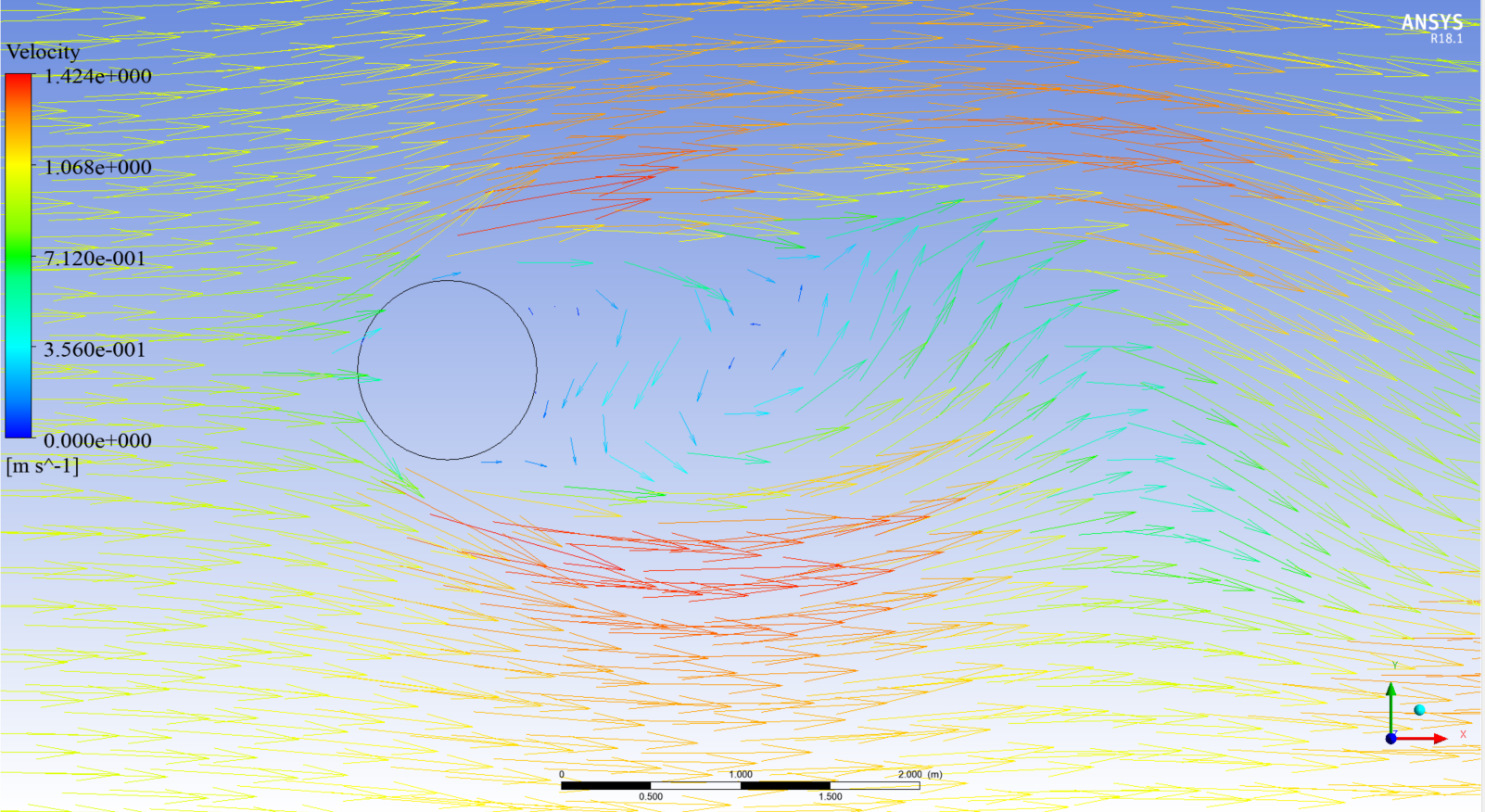
<p>To better view the change of flow after the cylinder, the vectors are shown below.</p>

<p>Case 1: Re = 10</p>

<p><img src="/uploads/images/2020/2020-04-16-flow-over-a-cylinder-with-ansys-fluent-3.png" alt="" width="1537" /></p>

<p>Case 2: Re = 100</p>

<p><img src="/uploads/images/2020/2020-04-16-flow-over-a-cylinder-with-ansys-fluent-4.png" alt="" width="1602" /></p>]]></content><author><name>Dorothy</name></author><category term="ANSYS" /><summary type="html"><![CDATA[I am currently learning ANSYS Fluent for my research. There are also many great YouTube videos about this. To inspire myself to keep learning and also to record part of life, I want to summarize the analysis results of transient flow over a cylinder in this post.]]></summary></entry><entry><title type="html">Multi spring elements in local coordinate system in ANSYS</title><link href="https://dorothydingzx.github.io/archives/multi-spring-elements-in-local-coordinate-system-in-ansys.html" rel="alternate" type="text/html" title="Multi spring elements in local coordinate system in ANSYS" /><published>2020-03-19T08:55:24+00:00</published><updated>2020-03-19T08:55:24+00:00</updated><id>https://dorothydingzx.github.io/archives/multi-spring-elements-in-local-coordinate-system-in-ansys</id><content type="html" xml:base="https://dorothydingzx.github.io/archives/multi-spring-elements-in-local-coordinate-system-in-ansys.html"><![CDATA[<p>I am using different spring elements for different directions in local coordinate system in ANSYS. At first, I could only add spring elements in global system even though I defined and activated local system, it just didn’t work. I searched on Google without satisfying results. Fortunately, I got this problem successfully solved with the help of a friend.</p>

<!-- more -->

<h3 id="problem-description">Problem description</h3>

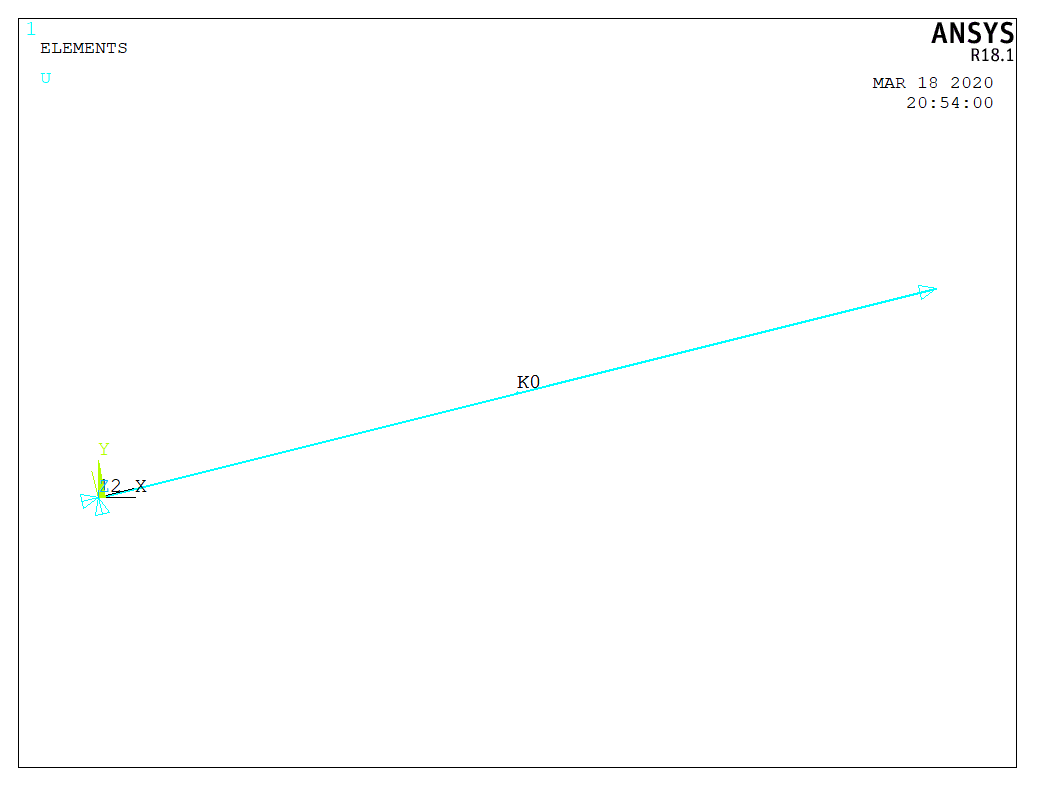
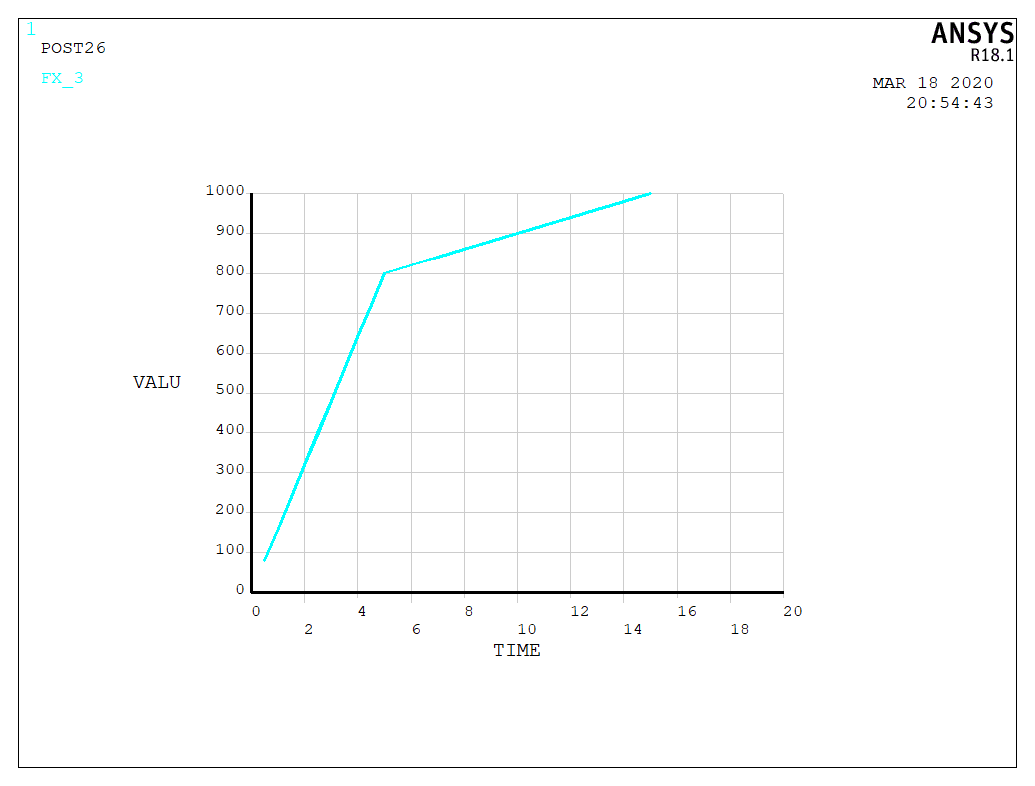
<p>In this testing example, I used a rotated cantilever beam with two spring elements at <em>x</em> and <em>y</em> directions in local coordinate system. Bilinear curves are adopted for each spring element. For the axial spring, the two points at the force displacement curve is (5,800) and (10,900). To better illustrate the force-displacement relationship of the results, I used displacement control method with a maximum axial displacement 15.</p>

<p>It is worthwhile to mention, you will get warning message like <code class="language-plaintext highlighter-rouge">Nodes I and J of element 1 ( COMBIN39 ) are not coincident.</code> after running the codes below, and this is because the two nodes of spring element should be at the same position. I used different nodes just to show the rotation more clearly. The results are the same as those from the correct model.</p>

<p><img src="/uploads/images/2020/2020-03-19-multi-spring-elements-in-local-coordinate-system-in-ansys-1.png" alt="" width="1038" /></p>

<h3 id="apdl-codes">APDL codes</h3>

<pre><code class="language-null">/PREP7
len = 50
u0 = 15
! spring element
! axial
ET,1,COMBIN39  
KEYOPT,1,1,0   
KEYOPT,1,2,0   
KEYOPT,1,3,0   
KEYOPT,1,4,0   
KEYOPT,1,6,0   
R,1,0,0,5,800,10,900,   
! transverse 1
ET,2,COMBIN39  
KEYOPT,2,1,0   
KEYOPT,2,2,0   
KEYOPT,2,3,2   
KEYOPT,2,4,0   
KEYOPT,2,6,0   
R,2,0,0,2,1500,8,3000, 

! model
CSYS,0
CLOCAL,12,0,0,0,0,14.03624347,0,0
N,1,0,0,0
N,2,len,0,0
! rotate nodes
NROTAT,1,1,12
NROTAT,2,2,12
! spring element
CSYS,12
TYPE,1
REAL,1
E,1,2
CSYS,12
TYPE,2
REAL,2
E,1,2

/SOLU
! fixed end
CSYS,12
ALLSEL,ALL
NSEL,S,NODE,,1
CM,BC_FIX,NODE
! free end
CSYS,12
ALLSEL,ALL
NSEL,S,NODE,,2
CM,free_end,NODE
! apply fixed boundary condition
CSYS,12
ALLSEL,ALL 
D,BC_FIX,ALL
! apply load
CSYS,12
ALLSEL,ALL
D,free_end, ,u0, , , ,UX, , , , ,
/SOLU
TIME,1
NSUBST,30,30,30
OUTRES,ALL,1
SOLVE

/POST1
RSYS,12
! force contour
PLESOL, F,X, 0,1.0  
</code></pre>

<h3 id="result-analysis">Result analysis</h3>

<p>Looking at the reaction force (axial component) and the axial displacement of the free end, the force displacement curve is plotted as the following figure. We can see the two points (5,800) and (10,900) defined in the axial spring element are also in this figure. The slope in the hardening part remain the same, which is consistent with the assumption of the spring element. When checking the UY and FY, we can see the values are nearly zero.</p>

<p><img src="/uploads/images/2020/2020-03-19-multi-spring-elements-in-local-coordinate-system-in-ansys-2.png" alt="" width="1035" /></p>

<h3 id="pay-attention">Pay attention:</h3>

<p>1. <strong>Node rotation</strong>: nodes associated with the spring elements <strong>have to be rotated before the analysis</strong>, or the spring will be defined in global coordinate system. No matter when you defined the node rotation, the directions of the forces applied on the rotated nodes will change to local axis.</p>

<p>2. Checking the force direction: if you define the node rotation after the load definition, refresh the window and then you can see the change of the force direction.</p>

<p>3. As explained in the ‘<em>problem description’</em> part, the two nodes of the spring element should be at the same position and you will get <strong>warning message</strong> with the codes in this post. However, the results are correct.</p>]]></content><author><name>Dorothy</name></author><category term="ANSYS" /><summary type="html"><![CDATA[I am using different spring elements for different directions in local coordinate system in ANSYS. At first, I could only add spring elements in global system even though I defined and activated local system, it just didn’t work. I searched on Google without satisfying results. Fortunately, I got this problem successfully solved with the help of a friend.]]></summary></entry><entry><title type="html">Run ANSYS with MATLAB for parametric analysis</title><link href="https://dorothydingzx.github.io/archives/run-ansys-with-matlab-for-parametric-analysis.html" rel="alternate" type="text/html" title="Run ANSYS with MATLAB for parametric analysis" /><published>2019-12-20T08:10:18+00:00</published><updated>2019-12-20T08:10:18+00:00</updated><id>https://dorothydingzx.github.io/archives/run-ansys-with-matlab-for-parametric-analysis</id><content type="html" xml:base="https://dorothydingzx.github.io/archives/run-ansys-with-matlab-for-parametric-analysis.html"><![CDATA[<p>I switched from ABAQUS to ANSYS for my current research, though I am more familiar with ABAQUS. I currently have all the APDL for my model and want to do parametric analysis which requires about 7 to 8 hours for the calculation of one model with 2 cores. To improve the efficiency of running macro files in ANSYS, I decide to use MATLAB to run ANSYS.</p>

<!-- more -->

<p>I never used this function before and I am also a beginner in ANSYS. I searched on Google and found there are different ways to realize this function. I asked a friend for help and she sent me three files, but I still cannot understand how to do. So I focused on her method and searched again. The descriptions are not so friendly for beginners, at least for me. How I hope there was a tutorial explaining how to run ANSYS with MATLAB for parametric study. After tried and tried again, finally I could run the model one by one automatically. I decided to record the method in this article and hope I can help someone else.</p>

<p><strong>First file: run_ansys.bat</strong></p>

<pre><code class="language-null">SET ANS_CONSEC=YES
SET ANSYS_LOCK=OFF
SET KMP_STACKSIZE=1024k
"C:\Program Files\ANSYS Inc\v181\ansys\bin\winx64\ANSYS181.exe" -b -i ansysinputreader.txt -o out.txt
</code></pre>

<p>The codes in the last line means ANSYS will read the ansysinputreader.txt file and store output to out.txt file. It should be noted that the default value for KMP_STACKSIZE is 512k, which may not be able to run your analysis. So you can set the value for your case. When I set it to 2048k (2 cores) in my laptop, it showed no responding in task manager. Thus, this value cannot be too large to be the same case as mine.</p>

<p><strong>Second file: ansysinputreader.txt</strong></p>

<pre><code class="language-null">/INPUT,test,'txt','C:\ANSYS\paper1\',,0
</code></pre>

<p>This file tell ANSYS which file to be run and also the location of the file. One thing I should record is that I tried many times and the output file showed it could not find test.txt file. Latter I found it worked if I just use <code class="language-plaintext highlighter-rouge">test,'txt'</code> , while all the sources I could find online use <code class="language-plaintext highlighter-rouge">'test','txt'</code>. I think this difference may be caused by different versions of ANSYS.</p>

<p>After you have the two files and then you can run the following codes in MATLAB. I put all the files in the same folder to avoid any error resulting from location of files.</p>

<p><strong>Run in MATLAB:</strong></p>

<div class="language-matlab highlighter-rouge"><div class="highlight"><pre class="highlight"><code><span class="nb">cd</span> <span class="s1">'C:\ANSYS\paper1'</span>
<span class="k">!</span>run_ansys.bat
</code></pre></div></div>

<p>After you successfully run the APDL codes in test.txt file, you will have out.txt file in your folder (defined in the first file) and the following codes will be in this file. You can also find errors, if any, in this file.</p>

<pre><code class="language-null">         *****  ANSYS COMMAND LINE ARGUMENTS  *****
 BATCH MODE REQUESTED (-b)    = LIST
 INPUT FILE COPY MODE (-c)    = COPY

RELEASE= Release 18.1         BUILD= 18.1      UP20170403   VERSION=WINDOWS x64 
CURRENT JOBNAME=file  12:50:41  DEC 19, 2019 CP=      0.281

    1  /INPUT,test,'txt','C:\ANSYS\paper1\',,0 

RUN SETUP PROCEDURE FROM FILE= C:\Program Files\ANSYS Inc\v181\ANSYS\apdl\start.ans

/INPUT FILE= C:\Program Files\ANSYS Inc\v181\ANSYS\apdl\start.ans  LINE=       0

/INPUT FILE= C:\ANSYS\paper1\test.txt  LINE=       0

*** ANSYS - ENGINEERING ANALYSIS SYSTEM  RELEASE Release 18.1     18.1     ***
ANSYS Mechanical Enterprise                       
00000000  VERSION=WINDOWS x64   12:50:41  DEC 19, 2019 CP=      0.375
</code></pre>

<p>Parametric analysis</p>

<p>I want to do parametric analysis with ANSYS and thus I should use MATLAB to run different models one by one. I used a for loop in MATLAB to write the second file test.txt everytime and then run bat file. The simplified codes of for loop is demonstrated below. I used <code class="language-plaintext highlighter-rouge">disp(wind_speed)</code>to remind me which model has been run.</p>

<div class="language-matlab highlighter-rouge"><div class="highlight"><pre class="highlight"><code><span class="n">matrix</span> <span class="o">=</span> <span class="p">[</span><span class="mi">60</span><span class="p">,</span><span class="mi">70</span><span class="p">,</span><span class="mi">80</span><span class="p">];</span>
<span class="k">for</span> <span class="n">wind_speed</span> <span class="o">=</span> <span class="n">matrix</span>
    <span class="n">fileID</span> <span class="o">=</span> <span class="nb">fopen</span><span class="p">(</span><span class="n">filename</span><span class="p">,</span> <span class="s1">'w+'</span><span class="p">);</span>
    <span class="nb">fprintf</span><span class="p">(</span><span class="n">fileID</span><span class="p">,</span> <span class="s1">'/CLEAR \n'</span><span class="p">);</span>
    <span class="nb">fprintf</span><span class="p">(</span><span class="n">fileID</span><span class="p">,</span> <span class="s1">'/PREP7 \n'</span><span class="p">);</span>
    <span class="nb">fclose</span><span class="p">(</span><span class="n">fileID</span><span class="p">);</span>
    <span class="err">!</span><span class="n">run_ansys</span><span class="o">.</span><span class="n">bat</span> 
    <span class="nb">cd</span> <span class="s1">'C:\ANSYS\paper1'</span>
    <span class="nb">disp</span><span class="p">(</span><span class="n">wind_speed</span><span class="p">)</span>
<span class="k">end</span>
</code></pre></div></div>

<div class="archived-comments">
<h3>5 Comments</h3>
<p class="archived-comments-note">These comments were left on the original WordPress version of this blog.</p>
<ol class="archived-comment-list">
<li class="archived-comment">
<div class="archived-comment-meta"><strong>Sateesh</strong> <span>April 14, 2021 at 18:22</span></div>
<div class="archived-comment-body"><p>Sir,<br />
After getting output.txt…. I want to extract stress values at different nodes stored in that output file… Can you help me out to solve it</p></div>
<ol class="archived-comment-children"><li class="archived-comment">
<div class="archived-comment-meta"><strong>Dorothy</strong> <span>April 15, 2021 at 03:47</span></div>
<div class="archived-comment-body"><p>Hi Sateesh,<br />
You might need Matlab or Python to deal with the txt file. You can search on google to see if there are some available codes to do this.</p></div>
<ol class="archived-comment-children"><li class="archived-comment">
<div class="archived-comment-meta"><strong>Sateesh</strong> <span>April 15, 2021 at 03:48</span></div>
<div class="archived-comment-body"><p>I tried with matlab sir, but not working properly…..</p></div>
</li></ol>
</li></ol>
</li>
<li class="archived-comment">
<div class="archived-comment-meta"><strong>Sateesh</strong> <span>April 15, 2021 at 03:49</span></div>
<div class="archived-comment-body"><p>There are no codes available in this topic sir…..</p></div>
</li>
<li class="archived-comment">
<div class="archived-comment-meta"><strong>Gustavo</strong> <span>June 6, 2022 at 03:43</span></div>
<div class="archived-comment-body"><p>hello, first of all. Thanks for this kind of material is rare.<br />
And how did you run in parametric way? Could you shared more material about ? Thanks a lot.</p></div>
</li>
</ol>
</div>]]></content><author><name>Dorothy</name></author><category term="ANSYS" /><summary type="html"><![CDATA[I switched from ABAQUS to ANSYS for my current research, though I am more familiar with ABAQUS. I currently have all the APDL for my model and want to do parametric analysis which requires about 7 to 8 hours for the calculation of one model with 2 cores. To improve the efficiency of running macro files in ANSYS, I decide to use MATLAB to run ANSYS.]]></summary></entry><entry><title type="html">Extracting data of node set from odb in ABAQUS</title><link href="https://dorothydingzx.github.io/archives/extracting-data-of-node-set-from-odb-in-abaqus.html" rel="alternate" type="text/html" title="Extracting data of node set from odb in ABAQUS" /><published>2019-05-16T11:33:08+00:00</published><updated>2019-05-16T11:33:08+00:00</updated><id>https://dorothydingzx.github.io/archives/extracting-data-of-node-set-from-odb-in-abaqus</id><content type="html" xml:base="https://dorothydingzx.github.io/archives/extracting-data-of-node-set-from-odb-in-abaqus.html"><![CDATA[<p>I want to extract reaction force and displacement of a certain point, which is a reference point established in INTERACTION module and set as a geometry set named ‘SET-3’. The error information will pop up when using the codes I often use, as ‘KeyError: SET-3’, which can be seen in the second code part.</p>

<!-- more -->

<p>I searched the <a href="http://ivt-abaqusdoc.ivt.ntnu.no:2080/v6.14/books/ker/default.htm">Abaqus Scripting Reference Guide</a> for ode objects (34.23), the methods to use node sets from Part, Assembly and Instance modules are listed below.</p>

<div class="language-python highlighter-rouge"><div class="highlight"><pre class="highlight"><code><span class="n">session</span><span class="p">.</span><span class="n">odbs</span><span class="p">[</span><span class="n">name</span><span class="p">].</span><span class="n">parts</span><span class="p">[</span><span class="n">name</span><span class="p">].</span><span class="n">NodeSet</span>                   
<span class="n">session</span><span class="p">.</span><span class="n">odbs</span><span class="p">[</span><span class="n">name</span><span class="p">].</span><span class="n">rootAssembly</span><span class="p">.</span><span class="n">instances</span><span class="p">[</span><span class="n">name</span><span class="p">].</span><span class="n">NodeSet</span>                   
<span class="n">session</span><span class="p">.</span><span class="n">odbs</span><span class="p">[</span><span class="n">name</span><span class="p">].</span><span class="n">rootAssembly</span><span class="p">.</span><span class="n">NodeSet</span>
</code></pre></div></div>

<p>To eliminate the effect of coupling, I established another two node sets, ‘SET-4’ and ‘SET-5’, in Assembly module, and used ‘SET-4’ to establish another coupling. The model was re-analyzed and the information was printed as follows.</p>

<div class="language-python highlighter-rouge"><div class="highlight"><pre class="highlight"><code><span class="o">&gt;&gt;&gt;</span> <span class="n">odbname</span>
<span class="s">'10fixed-pin-elastic-L100-sine-u-v.odb'</span>
<span class="o">&gt;&gt;&gt;</span> <span class="n">session</span><span class="p">.</span><span class="n">odbs</span><span class="p">[</span><span class="n">odbname</span><span class="p">].</span><span class="n">rootAssembly</span><span class="p">.</span><span class="n">nodeSets</span>
<span class="n">session</span><span class="p">.</span><span class="n">openOdb</span><span class="p">(</span><span class="sa">r</span><span class="s">'D:/Temp/10fixed-pin-elastic-L100-sine-u-v.odb'</span><span class="p">).</span><span class="n">rootAssembly</span><span class="p">.</span><span class="n">nodeSets</span>
<span class="c1"># print the node sets in odb assembly
</span><span class="o">&gt;&gt;&gt;</span> <span class="k">print</span> <span class="n">session</span><span class="p">.</span><span class="n">odbs</span><span class="p">[</span><span class="n">odbname</span><span class="p">].</span><span class="n">rootAssembly</span><span class="p">.</span><span class="n">nodeSets</span>
<span class="p">{</span><span class="s">' ALL NODES'</span><span class="p">:</span> <span class="s">'OdbSet object'</span><span class="p">,</span> <span class="s">'SET-1'</span><span class="p">:</span> <span class="s">'OdbSet object'</span><span class="p">,</span> <span class="s">'SET-2'</span><span class="p">:</span> <span class="s">'OdbSet object'</span><span class="p">}</span>
<span class="o">&gt;&gt;&gt;</span> <span class="k">print</span> <span class="n">session</span><span class="p">.</span><span class="n">odbs</span><span class="p">[</span><span class="s">'10fixed-pin-elastic-L-100-sine-u-v.odb'</span><span class="p">].</span><span class="n">rootAssembly</span><span class="p">.</span><span class="n">nodeSets</span>
<span class="p">{</span><span class="s">' ALL NODES'</span><span class="p">:</span> <span class="s">'OdbSet object'</span><span class="p">,</span> <span class="s">'ASSEMBLY_CONSTRAINT-2_REFERENCE_POINT'</span><span class="p">:</span> <span class="s">'OdbSet object'</span><span class="p">,</span> <span class="s">'ASSEMBLY_COUPLING-1_REFERENCE_POINT'</span><span class="p">:</span> <span class="s">'OdbSet object'</span><span class="p">,</span> <span class="s">'SET-1'</span><span class="p">:</span> <span class="s">'OdbSet object'</span><span class="p">,</span> <span class="s">'SET-2'</span><span class="p">:</span> <span class="s">'OdbSet object'</span><span class="p">,</span> <span class="s">'SET-3'</span><span class="p">:</span> <span class="s">'OdbSet object'</span><span class="p">,</span> <span class="s">'SET-4'</span><span class="p">:</span> <span class="s">'OdbSet object'</span><span class="p">,</span> <span class="s">'WarnNodeBCInactiveDof'</span><span class="p">:</span> <span class="s">'OdbSet object'</span><span class="p">}</span>
<span class="c1"># compare the different use of odbname
</span><span class="o">&gt;&gt;&gt;</span> <span class="n">session</span><span class="p">.</span><span class="n">odbs</span><span class="p">[</span><span class="n">odbname</span><span class="p">].</span><span class="n">rootAssembly</span><span class="p">.</span><span class="n">nodeSets</span><span class="p">[</span><span class="s">'SET-3'</span><span class="p">]</span>
<span class="nb">KeyError</span><span class="p">:</span> <span class="n">SET</span><span class="o">-</span><span class="mi">3</span>
<span class="o">&gt;&gt;&gt;</span> <span class="n">session</span><span class="p">.</span><span class="n">odbs</span><span class="p">[</span><span class="s">'10fixed-pin-elastic-L-100-sine-u-v.odb'</span><span class="p">].</span><span class="n">rootAssembly</span><span class="p">.</span><span class="n">nodeSets</span><span class="p">[</span><span class="s">'SET-3'</span><span class="p">]</span>
<span class="n">session</span><span class="p">.</span><span class="n">openOdb</span><span class="p">(</span><span class="sa">r</span><span class="s">'D:/Temp/10fixed-pin-elastic-L-100-sine-u-v.odb'</span><span class="p">).</span><span class="n">rootAssembly</span><span class="p">.</span><span class="n">nodeSets</span><span class="p">[</span><span class="s">'SET-3'</span><span class="p">]</span>
</code></pre></div></div>

<p>‘SET-5’ is not involved in rootAssembly, which is just a single reference point with no contribution to the model. There is something strange and confusing for me. As can be seen in the above codes, when I use the whole name of odb, ‘SET-3’ and ‘SET-4’ can be printed out, while only ‘SET-1’ and ‘SET-2’ appear when using odbname. The codes are the same in essence and the only difference lies in the way you use odbname, which puzzling me a lot.</p>

<p>Finally, I find what is going on! That is a minor mistake, but cost me so much time! The odbname is actually not the same, ’10fixed-pin-elastic-L100-sine-u-v.odb’ and ’10fixed-pin-elastic-L-100-sine-u-v.odb’. The latter is right with ‘-‘ after ‘L’. After modifying the odbname, it works. Since I have tested some models, the names are very similar with just little difference to differentiate the different settings in models. In the first model, there are only two node sets and the printed results are right.</p>

<div class="language-python highlighter-rouge"><div class="highlight"><pre class="highlight"><code><span class="o">&gt;&gt;&gt;</span> <span class="n">odbname</span>
<span class="s">'10fixed-pin-elastic-L-100-sine-u-v.odb'</span>
<span class="c1"># compare the different use of odbname
</span><span class="o">&gt;&gt;&gt;</span> <span class="n">session</span><span class="p">.</span><span class="n">odbs</span><span class="p">[</span><span class="n">odbname</span><span class="p">].</span><span class="n">rootAssembly</span><span class="p">.</span><span class="n">nodeSets</span><span class="p">[</span><span class="s">'SET-3'</span><span class="p">]</span>
<span class="n">session</span><span class="p">.</span><span class="n">openOdb</span><span class="p">(</span><span class="sa">r</span><span class="s">'D:/Temp/10fixed-pin-elastic-L-100-sine-u-v.odb'</span><span class="p">).</span><span class="n">rootAssembly</span><span class="p">.</span><span class="n">nodeSets</span><span class="p">[</span><span class="s">'SET-3'</span><span class="p">]</span>
<span class="o">&gt;&gt;&gt;</span> <span class="n">session</span><span class="p">.</span><span class="n">odbs</span><span class="p">[</span><span class="s">'10fixed-pin-elastic-L-100-sine-u-v.odb'</span><span class="p">].</span><span class="n">rootAssembly</span><span class="p">.</span><span class="n">nodeSets</span><span class="p">[</span><span class="s">'SET-3'</span><span class="p">]</span>
<span class="n">session</span><span class="p">.</span><span class="n">openOdb</span><span class="p">(</span><span class="sa">r</span><span class="s">'D:/Temp/10fixed-pin-elastic-L-100-sine-u-v.odb'</span><span class="p">).</span><span class="n">rootAssembly</span><span class="p">.</span><span class="n">nodeSets</span><span class="p">[</span><span class="s">'SET-3'</span><span class="p">]</span>
</code></pre></div></div>

<p>Just use this blog to remind myself to be more careful. Cautiousness improves efficiency, as well as thinking the problem over and sorting it out.</p>]]></content><author><name>Dorothy</name></author><category term="ABAQUS" /><summary type="html"><![CDATA[I want to extract reaction force and displacement of a certain point, which is a reference point established in INTERACTION module and set as a geometry set named ‘SET-3’. The error information will pop up when using the codes I often use, as ‘KeyError: SET-3’, which can be seen in the second code part.]]></summary></entry><entry><title type="html">Simulation of a bolted T-stub with ABAQUS</title><link href="https://dorothydingzx.github.io/archives/simulation-of-a-bolted-t-stub-with-abaqus.html" rel="alternate" type="text/html" title="Simulation of a bolted T-stub with ABAQUS" /><published>2019-04-13T18:20:29+00:00</published><updated>2019-04-13T18:20:29+00:00</updated><id>https://dorothydingzx.github.io/archives/simulation-of-a-bolted-t-stub-with-abaqus</id><content type="html" xml:base="https://dorothydingzx.github.io/archives/simulation-of-a-bolted-t-stub-with-abaqus.html"><![CDATA[<p>About one year ago, I tried to analyze a bolted T-stub to test the analysis method of bolted connections and verify my abaqus model referring to a journal paper, unfortunately, I could not find that paper now. Though I would not focus on steel connections in the future, I still want to make a summary of this simulation in order not to waste the effort one year ago.</p>

<!-- more -->

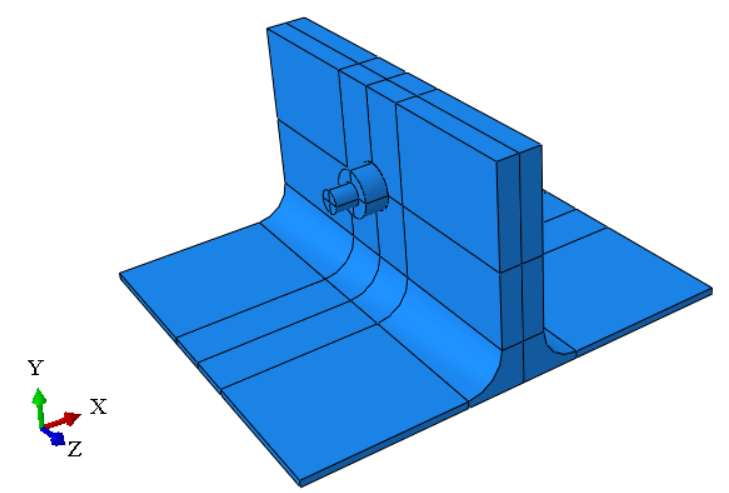
<p>Due to the symmetry of this stub, only half is modeled as below and the whole model is symmetric about X-Z plane, which means two T stubs are connected by one bolt on each side.</p>

<p><img src="/uploads/images/2019/2019-04-13-simulation-of-a-bolted-t-stub-with-abaqus-1.png" alt="" width="360" /></p>

<h2 id="contact">Contact</h2>

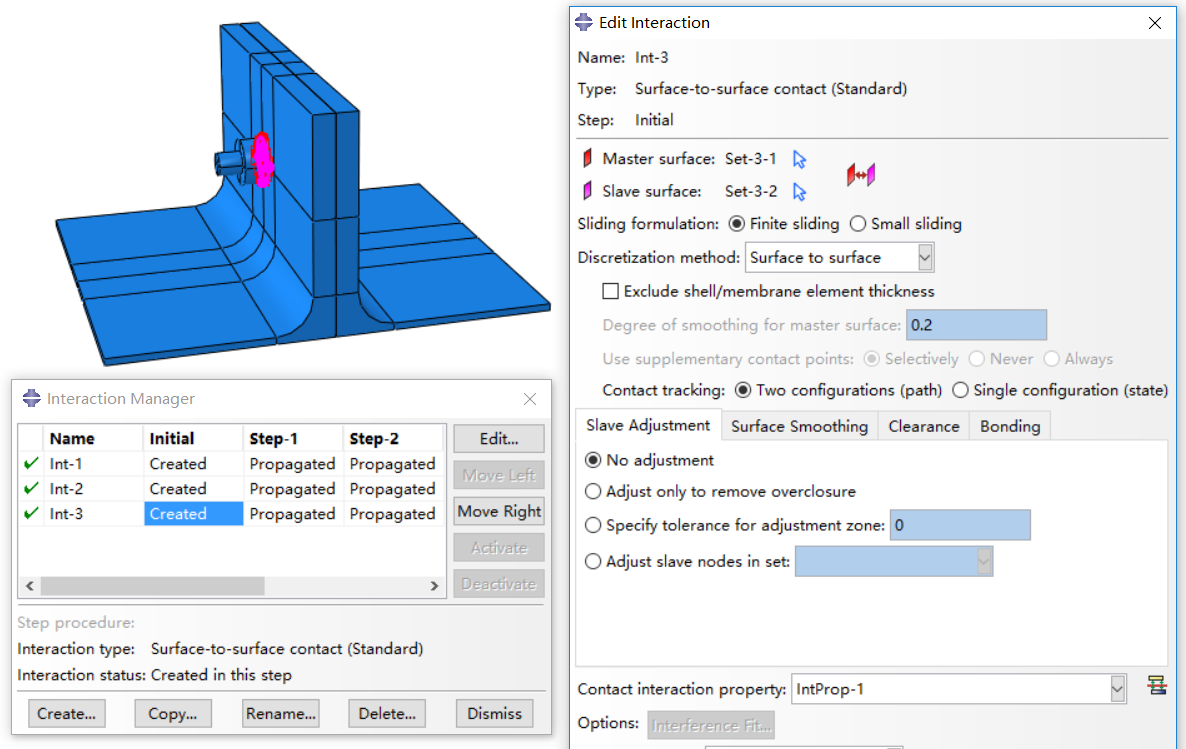
<p>One key in this simulation is the contact between stubs and bolts. As seen below, contact property is set for the interaction between stub and stub, bolt and stub (two contact faces). Both Normal and tangential behaviors are defined with “Hard” Contact and Friction coefficient 0.3 in this simulation. This is set to define the contact during analysis, so that the elements in different instances (two T-stubs and one bolt) will not intersect with each other when they are compressed together.</p>

<p><img src="/uploads/images/2019/2019-04-13-simulation-of-a-bolted-t-stub-with-abaqus-2.png" alt="" width="1186" /></p>

<h2 id="steps">Steps</h2>

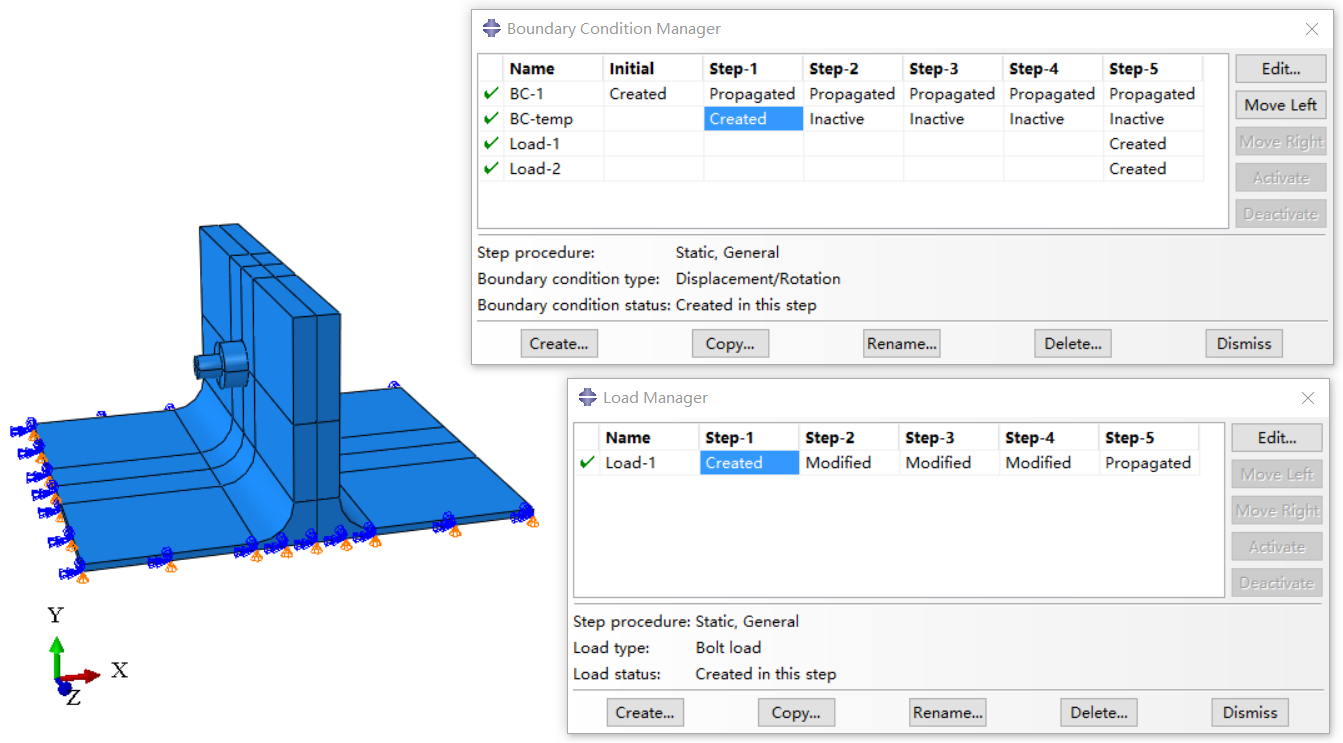
<p>The simulation process can be summarized as below and described with the following screenshot. Totally five steps are defied with Static, General procedure.</p>

<p>Initial step: Apply boundary conditions. A YSYMM symmetry boundary condition is adopted here.</p>

<p>Step 1: Apply bolt load with a low value and define a temporary boundary condition (BC). Aim of this step is to generate some pressure between bolts and stubs, as well as stub and stub, so that no rigid displacements will be generated in next steps. You can also just apply a bolt force without apply temporary BC, but you are recommended to have a temporary BC, otherwise the analysis may result in hard convergence. Temporary BC in this simulation is zero displacements in each directions on the outer surface of nut (Y-Z plane) so that the bolt cannot move during this step..</p>

<p>Step 2: Inactive the temporary BC and remain the applied bolt load.</p>

<p>Step 3: Increase the bolt load to the value you want. This step is to simulate the bolt load acting on the stubs. The value of bolt load is normally the bolt pretension which can be chosen according to codes.</p>

<p>Step 4: Modify the method of bolt load to ‘Fix at current length’. This means you have tightened the bolt, which will remain the ‘same’ during life cycle of bolted T-stub.</p>

<p>Step 5: Apply loads or displacements to T stubs. This is the final step to simulate the force on bolted T-stub. In this simulation, two equal displacements (X direction and reversed X direction) are applied on stubs at upper section (Y-Z plane).</p>

<p><img src="/uploads/images/2019/2019-04-13-simulation-of-a-bolted-t-stub-with-abaqus-3.png" alt="" width="1343" /></p>

<h2 id="results">Results</h2>

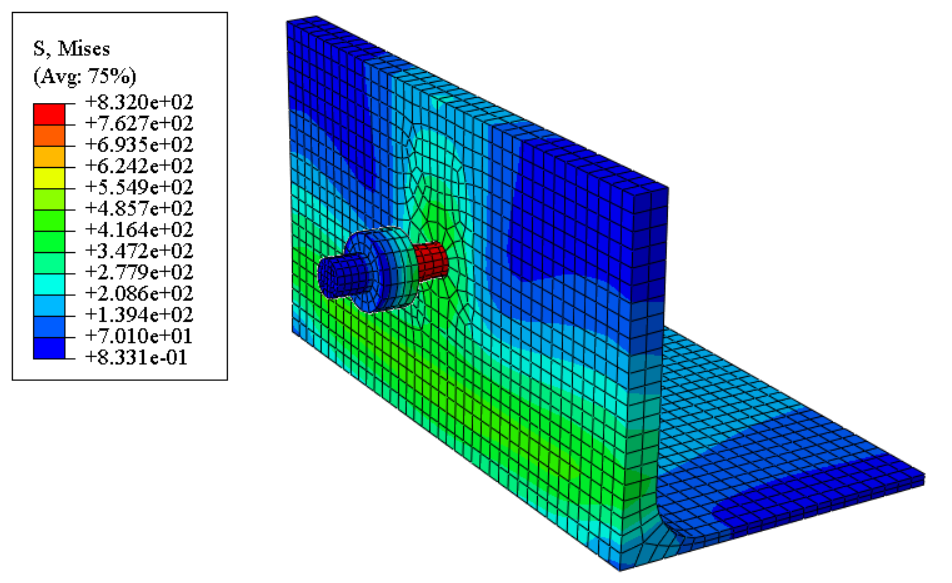
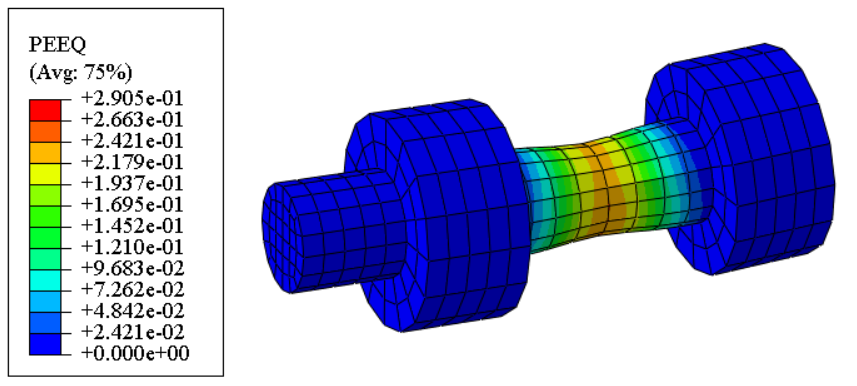
<p>To have a better view of the results, only part of the model are selected to be displaced. The stress contour of one stub and one bolt, the PEEQ contours of bolt and middle section of nut are shown respectively. Due to none plastic strain on stubs, stubs are removed from PEEQ contours.</p>

<p><img src="/uploads/images/2019/2019-04-13-simulation-of-a-bolted-t-stub-with-abaqus-4.png" alt="" width="433" /></p>

<p><img src="/uploads/images/2019/2019-04-13-simulation-of-a-bolted-t-stub-with-abaqus-5.png" alt="" width="396" /></p>

<p><img src="/uploads/images/2019/2019-04-13-simulation-of-a-bolted-t-stub-with-abaqus-6.png" alt="" width="283" /></p>

<div class="archived-comments">
<h3>1 Comment</h3>
<p class="archived-comments-note">These comments were left on the original WordPress version of this blog.</p>
<ol class="archived-comment-list">
<li class="archived-comment">
<div class="archived-comment-meta"><strong>christo</strong> <span>June 12, 2019 at 04:44</span></div>
<div class="archived-comment-body"><p>Amazing blog!</p></div>
</li>
</ol>
</div>]]></content><author><name>Dorothy</name></author><category term="ABAQUS" /><summary type="html"><![CDATA[About one year ago, I tried to analyze a bolted T-stub to test the analysis method of bolted connections and verify my abaqus model referring to a journal paper, unfortunately, I could not find that paper now. Though I would not focus on steel connections in the future, I still want to make a summary of this simulation in order not to waste the effort one year ago.]]></summary></entry><entry><title type="html">Fracture analysis of a metal specimen</title><link href="https://dorothydingzx.github.io/archives/fracture-analysis-of-a-metal-specimen.html" rel="alternate" type="text/html" title="Fracture analysis of a metal specimen" /><published>2019-04-08T14:39:53+00:00</published><updated>2019-04-08T14:39:53+00:00</updated><id>https://dorothydingzx.github.io/archives/fracture-analysis-of-a-metal-specimen</id><content type="html" xml:base="https://dorothydingzx.github.io/archives/fracture-analysis-of-a-metal-specimen.html"><![CDATA[<p>I analyzed a specimen of ductile material with explicit dynamic method about one year ago. Recently, I want to review the model and summarize the process of analysis.</p>

<!-- more -->

<h2 id="stress-and-strain-of-material-in-abaqus">Stress and strain of material in ABAQUS</h2>

<p>Stress and strain in the definition of material in abauqs should be converted to true stress \(\sigma\) and true plastic strain \({\varepsilon _p}\) from the data obtained in experiments. The stress and strain achieved in experiments are engineering stress \({\sigma _{{\rm{eng}}}}\) and engineering strain \({{\varepsilon _{{\rm{eng}}}}}\), respectively.</p>

<p>Considering the incompressibility of plastic material, which means constant volume, we get</p>

\[{l_0}{A_0} = lA\]

<p>in which, \({l_0}\) and \({A_0}\) are initial length and initial area, \({l}\) and \({A}\) are current length and current area. Thus, real stress \(\sigma\) can be derived as</p>

\[\sigma = \frac{F}{A} = \frac{F}{{{A_0}}}\frac{l}{{{l_0}}} = {\sigma _{{\rm{eng}}}}\frac{l}{{{l_0}}} = {\sigma _{{\rm{nom}}}}\left( {1 + {\varepsilon _{{\rm{eng}}}}} \right)\]

<p>Engineering strain \({{\varepsilon _{{\rm{eng}}}}}\) can be written as</p>

\[{\varepsilon _{{\rm{eng}}}} = \frac{{l - {l_0}}}{{{l_0}}} = \frac{l}{{{l_0}}} - 1\]

<p>Thus, the relation between real stress, real strain and engineering strain is given as</p>

\[\sigma = {\sigma _{{\rm{eng}}}}\left( {1 + {\varepsilon _{{\rm{eng}}}}} \right)\]

\[\varepsilon = \ln \left( {1 + {\varepsilon _{{\rm{eng}}}}} \right)\]

<p>Plastic strain can be obtained by subtracting the elastic part from total strain,</p>

\[{\varepsilon _p} = \varepsilon - {\varepsilon _e} = \varepsilon - \sigma /E\]

<h2 id="damage-and-failure-for-ductile-metal">Damage and failure for ductile metal</h2>

<h3 id="1-damage-initiation">#1. Damage initiation</h3>

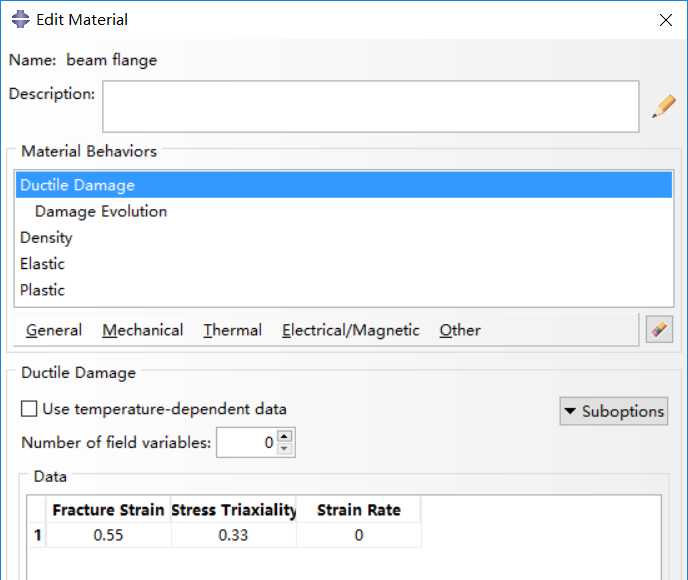
<p>The material damage initiation capability for ductile metals is intended as a general capability for predicting initiation of damage in metals, including ductile, shear and other criteria. Ductile criterion is used to predict the onset of damage in material, assuming the equivalent plastic strain is a function of stress triaxiality and strain rate.</p>

<p>To simulate the fracture of a coupon, the fracture stress and fracture strain should be calculated with a similar method as true stress and strain.</p>

\[{\sigma _f} = {F_f}/{A_f}\]

\[{\varepsilon _f} = \ln \left( {{A_0}/{A_f}} \right)\]

<p>As concluded in [1], fracture strain is critical to fracture of coupon, while stress triaxiality and strain rate has little influence. Displacement at failure (will be discussed below) has certain impact on fracture and results with small values are consistent. In this analysis, values in [1] are adopted, shown in the following figures.</p>

<p><img src="/uploads/images/2019/2019-04-08-fracture-analysis-of-a-metal-specimen-1.png" alt="" width="506" /></p>

<h3 id="2-damage-evolution-for-ductile-metals">#2. Damage evolution for ductile metals</h3>

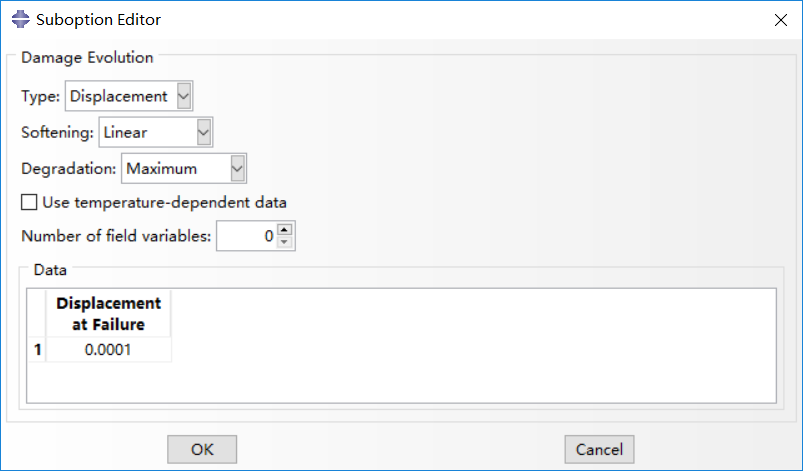
<p>Damage evolution capability for ductile metals assumes that damage is characterized by the progressive degradation of the material stiffness, leading to material failure. It also takes into account the combined effect of different damage mechanisms acting simultaneously on the same material and includes options to specify how each mechanism contributes to the overall material degradation. Two types of damage evolution methods are available in abaqus, displacement type (based on effective plastic displacement) and energy type (based on energy dissipated during the damage process).</p>

<p>Displacement type is adopted in damage evolution. Once the damage initiation criterion has been reached, the effective plastic displacement can be defined with the characteristic length of the element. Instantaneous failure will occur if the plastic displacement at failure is specified as 0, which is not recommended by abaqus because it causes a sudden drop of the stress at material point that can lead to dynamic instabilities. The linear damage evolution law defines a truly linear stress-strain softening response only if the effective response of the material is perfectly plastic (constant yield stress) after damage initiation. For mare details, one can refer to <a href="http://130.149.89.49:2080/v6.14/books/usb/default.htm">Abaqus Analysis User’s Guide</a>.</p>

<p><img src="/uploads/images/2019/2019-04-08-fracture-analysis-of-a-metal-specimen-2.png" alt="" width="540" /></p>

<h3 id="-3-element-removal-from-mesh"># 3. Element removal from mesh</h3>

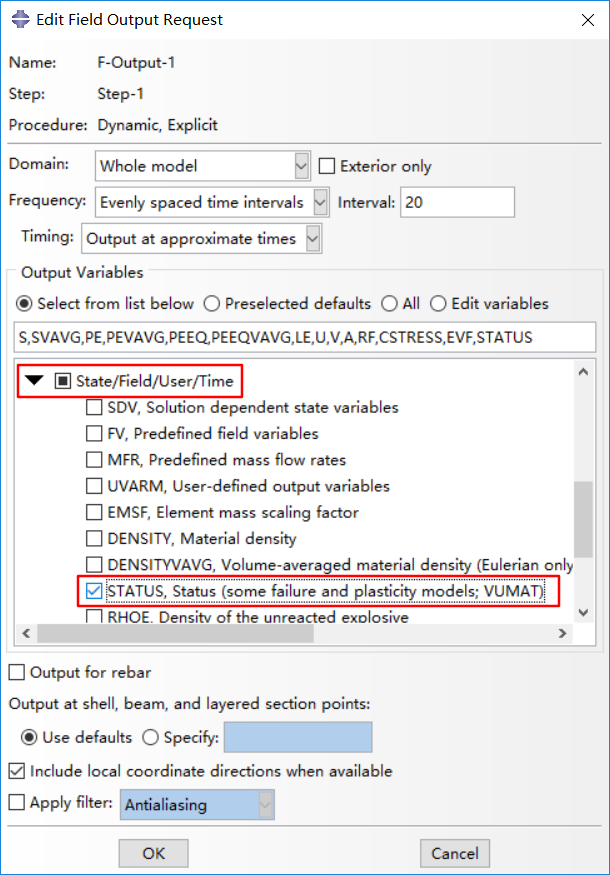
<p>One point should be noticed that <strong>Status</strong> in field output should be ticked, so that elements with strain up to fracture strain will be deleted and you can obtain the fracture deformation you want, or the element will be scratched which would be annoying. The overall scalar stiffness degradation, SDEG, is also available for output.</p>

<p>The removal of a solid element takes place, by default, when maximum degradation is reached at any one integration point in abaqus/explicit, while only all of the section points at all the integration locations of an element reach maximum degradation in abaqus/standard.</p>

<p><img src="/uploads/images/2019/2019-04-08-fracture-analysis-of-a-metal-specimen-3.png" alt="" width="436" /></p>

<h2 id="simulation-results">Simulation results</h2>

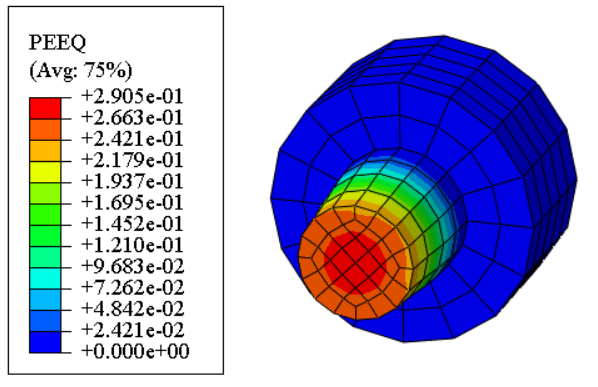
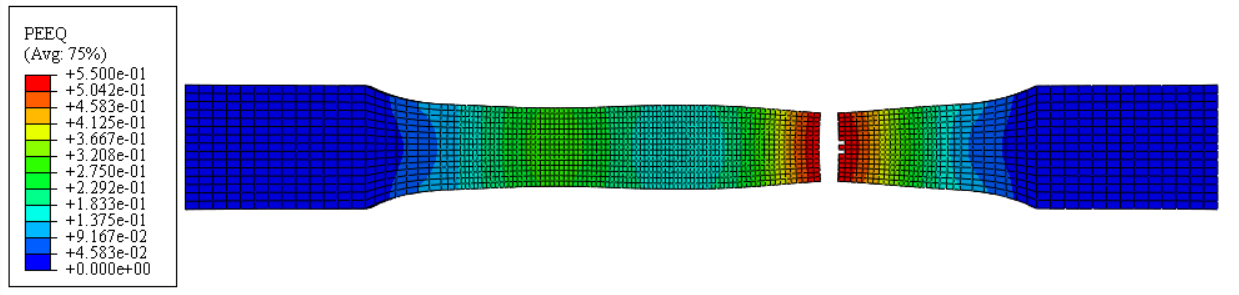
<p>A coupon is analyzed with dynamic explicit method and displacement control is adopted with one boundary fixed and the other boundary coupled to a reference point. Smooth step for amplitude with a displacement rate of 10mm in 5000 seconds.</p>

<p><img src="/uploads/images/2019/2019-04-08-fracture-analysis-of-a-metal-specimen-4.png" alt="" width="1239" /></p>

<p>As can be seen in the above figure, elements with equivalent plastic strain (PEEQ) reaching fracture strain are deleted in viewport. However, the fracture of specimen does not locate in the middle part, which puzzling me. I have checked the geometric information, the boundary and loading conditions, as well as the materials. Other methods like excluding coupling in interaction have also be tested and the same results are achieved.</p>

<p><strong>Reference:</strong></p>

<p>[1] Ling Li, Behavior of Steel Beam-to-Column Connections in Structural Progressive Collapse. [PhD thesis], Tongji University, 2014.</p>

<div class="archived-comments">
<h3>4 Comments</h3>
<p class="archived-comments-note">These comments were left on the original WordPress version of this blog.</p>
<ol class="archived-comment-list">
<li class="archived-comment">
<div class="archived-comment-meta"><strong>Tupa</strong> <span>May 21, 2019 at 05:24</span></div>
<div class="archived-comment-body"><p>Just checking in to register my support.  Your post is well put together Great job!</p></div>
</li>
<li class="archived-comment">
<div class="archived-comment-meta"><strong>wetzel</strong> <span>May 30, 2019 at 04:48</span></div>
<div class="archived-comment-body"><p>Never quit moving. Goals!</p></div>
</li>
<li class="archived-comment">
<div class="archived-comment-meta"><strong>Galiano</strong> <span>June 15, 2019 at 20:48</span></div>
<div class="archived-comment-body"><p>Cool</p></div>
</li>
<li class="archived-comment">
<div class="archived-comment-meta"><strong>Formica</strong> <span>June 22, 2019 at 02:38</span></div>
<div class="archived-comment-body"><p>You make some solid statements.</p></div>
</li>
</ol>
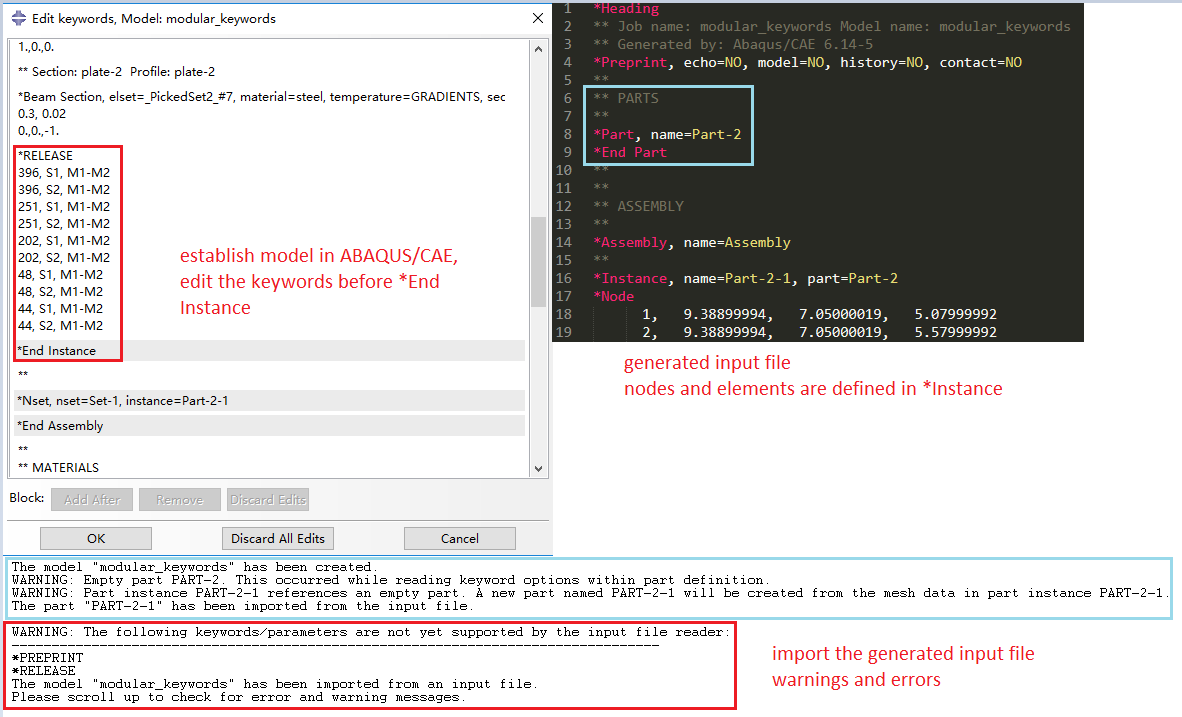
</div>]]></content><author><name>Dorothy</name></author><category term="ABAQUS" /><summary type="html"><![CDATA[I analyzed a specimen of ductile material with explicit dynamic method about one year ago. Recently, I want to review the model and summarize the process of analysis.]]></summary></entry><entry><title type="html">Warnings on keywords when importing input file to ABAQUS</title><link href="https://dorothydingzx.github.io/archives/warnings-on-keywords-when-importing-input-file-to-abaqus.html" rel="alternate" type="text/html" title="Warnings on keywords when importing input file to ABAQUS" /><published>2019-01-11T13:27:39+00:00</published><updated>2019-01-11T13:27:39+00:00</updated><id>https://dorothydingzx.github.io/archives/warnings-on-keywords-when-importing-input-file-to-abaqus</id><content type="html" xml:base="https://dorothydingzx.github.io/archives/warnings-on-keywords-when-importing-input-file-to-abaqus.html"><![CDATA[<p>I want to analyze a steel frame with pin connections at both sides or one side at some beams. I found the keyword <strong>*Release</strong> is very useful and convenient, so I resort to this keyword. I wrote the input file with the same syntax rules, so that it will be more convenient for me to establish more models. However, when I try to run the input file, there are warnings and errors even with the input file generated from a successfully run job in CAE. The problem is described in the following figure.</p>

<!-- more -->

<p><img src="/uploads/images/2019/2019-01-11-warnings-on-keywords-when-importing-input-file-to-abaqus-1.png" alt="" width="1182" /></p>

<p>In ABAQUS/CAE, I used python to establish the model. It should be noted that I merged the whole model in the <strong>Assembly</strong> section. Then I edited the keywords and added the <strong>*Release</strong> part before the <strong>*End Instance</strong>. In the generated input file after successfully finished the job analysis, the nodes and elements are established in the <strong>*Instance</strong> part. When I import this input file into ABAQUS or just run it with Abaqus Command window, warnings and errors occur as the bottom part in the above figure. The model is then established in the <strong>*Part</strong> part and the keyword <strong>*Release</strong> cannot be imported.</p>

<p>For the warnings, I rewrite the input file with the nodes and elements definition in the <strong>*Part</strong> part and then there are no warnings. This is because the independent instance in abaqus and if you use a dependent instance, the nodes and elements definitions will be written in the <strong>*Part</strong> part in the generated input file. The difference between the dependent and independent instance is the mesh object, part or assembly.</p>

<p>In the <a href="http://abaqus.software.polimi.it/v6.14/books/key/default.htm?startat=ch17abk14.html#usb-kws-mrelease">Abaqus Keywords Reference Guide</a> , the level of keyword <strong>*Release</strong> is either <strong>Part</strong> or <strong>Part instance</strong>. However, I added the keywords before the <strong>*End Instance</strong> or the <strong>*End Part</strong>, there were still error with the keywords. I tried to add the keywords somewhere else, and the error occurred as follow, which is consistent to the contents in “Abauqs keywords Reference Guide”.</p>

<p><em>Error in job Job-1: in keyword *RELEASE, file “Job-1.inp”, line 3593: The keyword is misplaced. It can be suboption for the following keyword(s)/level(s): instance, part</em></p>

<p>Then I tried to run the input file in the other two ways. One method is to create a job in abaqus and to choose input file as source. Another method is to run the input file directly with Abaqus Command. With the code “<strong><em>abaqus help</em></strong>”, you can get all the command codes, which is very useful. The code for running the input file directly is “<strong><em>abaqus job=job-name</em></strong>”. However, the error still occurred.</p>

<p>Finally, I found the reason about this error, that is the input file directly imported in to abaqus does not support any additional keywords you added and it only support the keywords that can be generated from the commands in ABAQUS/CAE. As the prompt error shows:</p>

<p><em>WARNING: The following keywords/parameters are not yet supported by the input file reader:</em><br />
<em>———————————————————————————</em><br />
<em>*RELEASE</em></p>

<p>The solution for this is to import the input file and then add the keywords with the function “<strong><em>Edit Keywords…</em></strong>” manually, though it is quite troublesome.</p>

<div class="archived-comments">
<h3>4 Comments</h3>
<p class="archived-comments-note">These comments were left on the original WordPress version of this blog.</p>
<ol class="archived-comment-list">
<li class="archived-comment">
<div class="archived-comment-meta"><strong>Peggy</strong> <span>November 8, 2021 at 05:25</span></div>
<div class="archived-comment-body"><p>Great Job on your blog.</p></div>
</li>
<li class="archived-comment">
<div class="archived-comment-meta"><strong>Peggy</strong> <span>November 10, 2021 at 00:36</span></div>
<div class="archived-comment-body"><p>Hi, great explanation.</p><p>What have you added as an element number or element set label?<br />
I need to release M1, at  beams ends. So I created sets based on the geometry selection, and as an element set label,I put the created set (eg Set-1).<br />
It worked for a simple one storey frame, but it didn’t for the beams of a multistorey building. Do you have any idea about where the problem is?</p></div>
<ol class="archived-comment-children"><li class="archived-comment">
<div class="archived-comment-meta"><strong>Dorothy</strong> <span>November 15, 2021 at 04:16</span></div>
<div class="archived-comment-body"><p>Hi Peggy,<br />
I tried to find the model I used in this blog but unfortunately I could not find this one. Since this blog was written years ago, I cannot remember exactly what I added as element set label. But I normally first select the nodes or elements in python script by the locations of them and give a name for the set.<br />
From my understanding to your model description, I think the assembly of parts might be one possible reason for multistory building. You might need to merge the instances first. Otherwise there will be more than one nodes corresponding to the same position (it actually should be one node there), and then the degrees of freedom of the two or more nodes will be inconsistent. Hope this helps.</p></div>
</li></ol>
</li>
<li class="archived-comment">
<div class="archived-comment-meta"><strong>Peggy</strong> <span>November 21, 2021 at 21:36</span></div>
<div class="archived-comment-body"><p>Thank you for your answer.  I think sets would helpf if I had had merged all the individual parts together. I worked the full model as a whole instance and then I entered the release keyword for just the node labels of the ends. The beam ends were then rereased successfully.</p></div>
</li>
</ol>
</div>]]></content><author><name>Dorothy</name></author><category term="ABAQUS" /><summary type="html"><![CDATA[I want to analyze a steel frame with pin connections at both sides or one side at some beams. I found the keyword *Release is very useful and convenient, so I resort to this keyword. I wrote the input file with the same syntax rules, so that it will be more convenient for me to establish more models. However, when I try to run the input file, there are warnings and errors even with the input file generated from a successfully run job in CAE. The problem is described in the following figure.]]></summary></entry><entry><title type="html">Transverse shear stiffness of beam in ABAQUS</title><link href="https://dorothydingzx.github.io/archives/transverse-shear-stiffness-of-beam-in-abaqus.html" rel="alternate" type="text/html" title="Transverse shear stiffness of beam in ABAQUS" /><published>2018-10-03T17:39:37+00:00</published><updated>2018-10-03T17:39:37+00:00</updated><id>https://dorothydingzx.github.io/archives/transverse-shear-stiffness-of-beam-in-abaqus</id><content type="html" xml:base="https://dorothydingzx.github.io/archives/transverse-shear-stiffness-of-beam-in-abaqus.html"><![CDATA[<h2 id="calculation-of-transverse-shear-stiffness">Calculation of transverse shear stiffness</h2>

<h3 id="definition">Definition</h3>

<p>The <strong>effective transverse shear stiffness</strong> of the section of a shear flexible beam is defined in Abaqus as</p>

\[{\overline K _{\alpha 3}} = f_p^\alpha {K_{\alpha 3}}\]

<p>where \({\overline K _{\alpha 3}}\) is the section shear stiffness in the \(\alpha\)-direction; \({K_{\alpha 3}}\) is the <strong>actual shear stiffness</strong> of the section having units of force; and \(\alpha = 1,{\kern 1pt} {\kern 1pt} {\kern 1pt} 2\) are the local directions of the cross-section. \(f_p^\alpha\) is a dimensionless factor used to prevent the shear stiffness from becoming too large in slender beam elements and is <strong>always included</strong> in the calculation of transverse shear stiffness defined as</p>

\[f_p^\alpha = \frac{1}{{1 + \xi \cdot SCF\frac{{{l^2}A}}{{12{I_{\alpha \alpha }}}}}}\]

<p>where <em>l</em> is the <strong><em>length of the element</em></strong>, <em>A</em> is the cross-sectional area, \({{I_{\alpha \alpha }}}\) is the inertia in the \(\alpha\)-direction, <em>SCF</em> is the <strong>slenderness compensation factor</strong> (with a default value of 0.25), and \(\xi\) is a constant of value 1.0 for first-order elements and 10⁻⁴ for second-order elements.</p>

<!-- more -->

\[\overline K _{\alpha \beta }^{ts} = {f_p}K_{\alpha \beta }^{ts}\]

\[{f_p} = \frac{1}{{1 + \xi \cdot SCF\frac{{{l^2}\left( {EA} \right)}}{{12{{\left( {EI} \right)}_{\alpha v}}}}}}\]

\[{\left( {EI} \right)_{\alpha v}} = \frac{{{{\left( {EI} \right)}_{11}} + {{\left( {EI} \right)}_{22}} + {{\left( {EI} \right)}_{12}}}}{2}\]

<p>You can define the \({K_{\alpha 3}}\) or \(K_{\alpha \beta }^{ts}\) as described below. If you do not specify them, they are defined by</p>

<p>\({K_{\alpha 3}} = kGA\) or \(K_{\alpha \beta }^{ts} = k{\left( {GA} \right)_{\alpha \beta }}\)</p>

<p>where <em>G</em> is the elastic shear modulus or moduli of the beam section. Temperature and field variable dependencies of <em>G</em> are not taken into account when calculating \({K_{\alpha 3}}\) and \(K_{\alpha \beta }^{ts}\). The shear factor <em>k</em> (Cowper, 1966) is adopted in ABAQUS referring to <a href="https://www.sharcnet.ca/Software/Abaqus/6.14.2/v6.14/books/usb/default.htm?startat=pt06ch29s04alm13.html">Abaqus Analysis User’s Guide</a>.</p>

<h3 id="keywords-edition">Keywords edition</h3>

<p><strong>Data line when used with *BEAM GENERAL SECTION, SECTION=MESHED:</strong></p>

<p><strong>First (and only) line:</strong></p>

<ul>
  <li>
    <p>Value of the shear stiffness of the section in the first direction, \(K_{11}^{ts}\).</p>
  </li>
  <li>
    <p>Value of the shear stiffness of the section in the second direction, \(K_{22}^{ts}\).</p>
  </li>
  <li>
    <p>Value of the coupling term in the shear stiffness of the section, \(K_{12}^{ts}\).</p>
  </li>
</ul>

<p>If either value \(K_{11}^{ts}\) or \(K_{22}^{ts}\) is omitted or given as zero, the nonzero value will be used for both.</p>

<p><strong>Data line when used with all other beam sections:</strong></p>

<p><strong>First (and only) line:</strong></p>

<ul>
  <li>
    <p>Value of the \(K_{23}\) shear stiffness of the section.</p>
  </li>
  <li>
    <p>Value of the \(K_{13}\) shear stiffness of the section.</p>
  </li>
  <li>
    <p>Value of the slenderness compensation factor or the label <em>SCF</em>. If this field is left blank, a default value of 0.25 is assumed. If the label <em>SCF</em> is <strong>specified</strong>, the values of the shear stiffness specified by the user will be <strong>ignored</strong>. They and the slenderness compensation factor will be calculated from the elastic material definition with the beam section.</p>
  </li>
</ul>

<p>If either value \({K_{\alpha 3}}\) is omitted or given as zero, the nonzero value will be used for both when the label <em>SCF</em> is not used.</p>

<p><strong>Notes in <a href="http://abaqus.software.polimi.it/v6.14/books/usb/pt06ch29s03alm08.html" title="29.3.3 Choosing a beam element">29.3.3 Choosing a beam element</a> :</strong></p>

<p>You can also define the slenderness compensation factor. The default value for the slenderness compensation factor is 0.25. If a slenderness compensation factor value is provided, you must also provide the values of the shear stiffness \({K_{\alpha 3}}\).</p>

<p>In the case of <strong>first-order elements</strong>, you may define the slenderness compensation factor by including the label SCF. Abaqus will then use a slenderness compensation factor of \(SCF = \frac{{kGA}}{{EA}}\) , and any values of \({K_{\alpha 3}}\) that you specify are ignored. Instead, the \({K_{\alpha 3}}\) values are calculated from the elastic material definition.</p>

<p>The transverse shear stiffness is not relevant to Euler-Bernoulli beam elements for which the transverse shear constraints are satisfied exactly.</p>

<h2 id="verification-examples">Verification examples</h2>

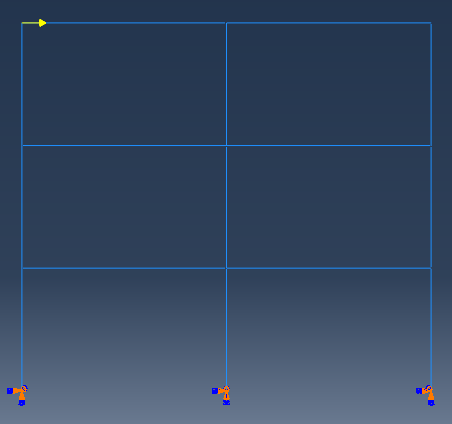
<p>The model for verification is the same as that in <a href="/archives/beam-elements-in-abaqus.html">Beam elements in ABAUQS</a>. Both the first-order and second-order elements are adopted in this example.</p>

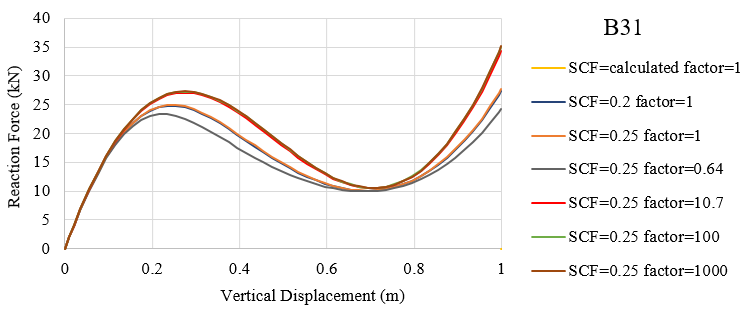
<h3 id="first-order-element-b31">First-order element B31</h3>

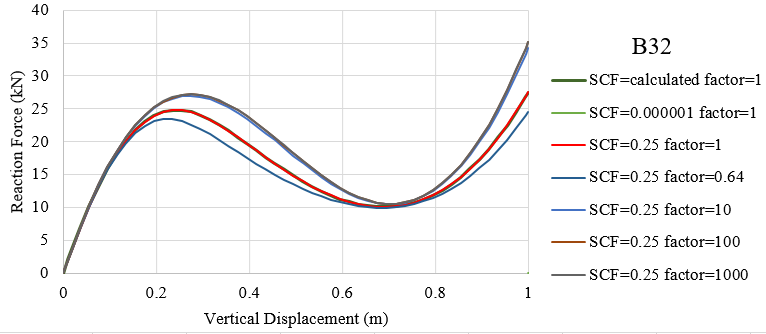
<p>The default value of SCF for first-order elements is defined as \(SCF = \frac{{kGA}}{{EA}}\) and in this example default SCF=0.2. The dimensionless factor \(f_p^\alpha\) with different SCF values are adopted for comparison. The stiffness factor in the following list is a scale of actual shear stiffness \({K_{\alpha 3}}\) and the relative values of section shear stiffness \({\overline K _{\alpha 3}}\) are also given.</p>

<table>
  <thead>
    <tr>
      <th> </th>
      <th> </th>
      <th> </th>
      <th> </th>
    </tr>
  </thead>
  <tbody>
    <tr>
      <td>SCF</td>
      <td>dimensionless \(f_p^\alpha\)</td>
      <td>stiffness factor</td>
      <td>relative value of \({\overline K _{\alpha 3}}\)</td>
    </tr>
    <tr>
      <td>0.20</td>
      <td>0.9954</td>
      <td>1</td>
      <td>0.9954</td>
    </tr>
    <tr>
      <td>0.0001</td>
      <td>1.0000</td>
      <td>1</td>
      <td>1.0000</td>
    </tr>
    <tr>
      <td>0.25</td>
      <td>0.9944</td>
      <td>1</td>
      <td>0.9944</td>
    </tr>
    <tr>
      <td><strong>0.25</strong></td>
      <td><strong>0.9944</strong></td>
      <td><strong>0.643</strong></td>
      <td><strong>0.6394</strong></td>
    </tr>
    <tr>
      <td><em>0.25</em></td>
      <td><em>0.9944</em></td>
      <td><em>10.7</em></td>
      <td><em>10.6401</em></td>
    </tr>
    <tr>
      <td><em>0.25</em></td>
      <td><em>0.9944</em></td>
      <td><em>100</em></td>
      <td><em>99.4398</em></td>
    </tr>
    <tr>
      <td><em>0.25</em></td>
      <td><em>0.9944</em></td>
      <td><em>1000</em></td>
      <td><em>994.3976</em></td>
    </tr>
    <tr>
      <td><strong>25</strong></td>
      <td><strong>0.6396</strong></td>
      <td><strong>1</strong></td>
      <td><strong>0.6396</strong></td>
    </tr>
    <tr>
      <td>2500</td>
      <td>0.0174</td>
      <td>1</td>
      <td>0.0174</td>
    </tr>
    <tr>
      <td>250000</td>
      <td>0.0002</td>
      <td>1</td>
      <td>0.0002</td>
    </tr>
  </tbody>
</table>

<p><img src="/uploads/images/2018/2018-10-03-transverse-shear-stiffness-of-beam-in-abaqus-1.png" alt="" width="607" /></p>

<p>The force-displacement curves with SCF=(0.0001, 0.2, calculated in abaqus, 0.25) and stiffness factor=1 are very close to each other with the relative values of \({\overline K _{\alpha 3}}\) approach to 1.0. Also, curves with SCF=0.25, stiffness factor=(10.7, 100, 1000) accord well with each other with the relative values of \({\overline K _{\alpha 3}}\) greater than 10.0 and vary each other. The obvious differences between curves with SCF=0.25, stiffness factor=(1, 0.64, 10.7) are observed in the above figure and the resistance of frame enhances with higher transverse shear stiffness.</p>

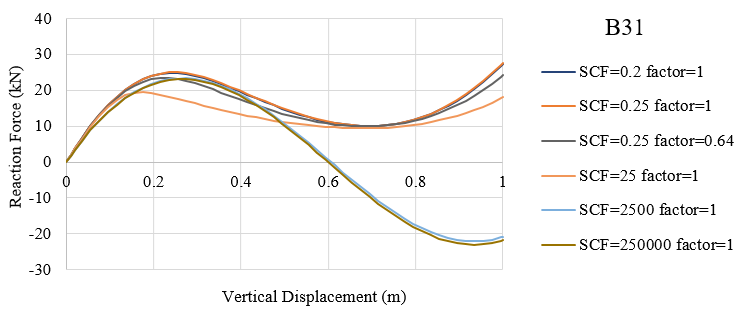
<p><img src="/uploads/images/2018/2018-10-03-transverse-shear-stiffness-of-beam-in-abaqus-2.png" alt="" width="699" /></p>

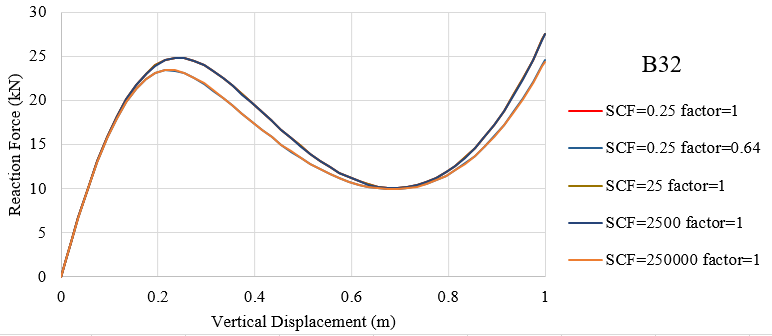
<p>With the increase in SCF value (0.25, 25, 2500, 250000) and a constant stiffness factor 1.0, the relative value of \({\overline K _{\alpha 3}}\) decreases and the curves lower. The difference between SCF values (2500, 250000) is slight and conclusion can be made that when the the relative value of \({\overline K _{\alpha 3}}\) is lower than 0.02, the displacements of structures are similar with different SCF values.</p>

<p>It is noted that the relative values of \({\overline K _{\alpha 3}}\) with (SCF, stiffness)=(0.25, 0.643) and (25, 1) are very close while the curves differ. <strong><em>The reason for this is unclear for me</em></strong>.</p>

<h3 id="second-order-element-b32">Second-order element B32</h3>

<p>The default value of SCF for second-order elements is 0.25 and different SCF values same as above are adopted for comparison. Similar procedures are utilized and similar conclusions can be drawn.</p>

<table>
  <thead>
    <tr>
      <th> </th>
      <th> </th>
      <th> </th>
      <th> </th>
    </tr>
  </thead>
  <tbody>
    <tr>
      <td>SCF</td>
      <td>dimensionless \(f_p^\alpha\)</td>
      <td>stiffness factor</td>
      <td>relative value of \({\overline K _{\alpha 3}}\)</td>
    </tr>
    <tr>
      <td>0.0001</td>
      <td>1.0000</td>
      <td>1</td>
      <td>1.0000</td>
    </tr>
    <tr>
      <td>0.25</td>
      <td>1.0000</td>
      <td>1</td>
      <td>1.0000</td>
    </tr>
    <tr>
      <td><strong>0.25</strong></td>
      <td><strong>1.0000</strong></td>
      <td><strong>0.64</strong></td>
      <td><strong>0.6400</strong></td>
    </tr>
    <tr>
      <td><em>0.25</em></td>
      <td><em>1.0000</em></td>
      <td><em>10</em></td>
      <td><em>10.0000</em></td>
    </tr>
    <tr>
      <td><em>0.25</em></td>
      <td><em>1.0000</em></td>
      <td><em>100</em></td>
      <td><em>99.9999</em></td>
    </tr>
    <tr>
      <td><em>0.25</em></td>
      <td><em>1.0000</em></td>
      <td><em>1000</em></td>
      <td><em>999.9994</em></td>
    </tr>
    <tr>
      <td>25</td>
      <td>0.9999</td>
      <td>1</td>
      <td>0.9999</td>
    </tr>
    <tr>
      <td>2500</td>
      <td>0.9944</td>
      <td>1</td>
      <td>0.9944</td>
    </tr>
    <tr>
      <td><strong>250000</strong></td>
      <td><strong>0.6396</strong></td>
      <td><strong>1</strong></td>
      <td><strong>0.6396</strong></td>
    </tr>
  </tbody>
</table>

<p><img src="/uploads/images/2018/2018-10-03-transverse-shear-stiffness-of-beam-in-abaqus-3.png" alt="" width="582" /></p>

<p>The force-displacement curves with SCF=(0.000001, 0.25, calculated in abaqus) and stiffness factor=1 are very close to each other with the relative values of \({\overline K _{\alpha 3}}\) equal to 1.0. Also, curves with SCF=0.25, stiffness factor=(10, 100, 1000) accord well with each other with the relative values of \({\overline K _{\alpha 3}}\) greater than 10.0 and vary each other. The obvious differences between curves with SCF=0.25, stiffness factor=(1, 0.64, 10) are observed in the above figure. The resistance of frame enhances with higher transverse shear stiffness and the enhancement is limited.</p>

<p><img src="/uploads/images/2018/2018-10-03-transverse-shear-stiffness-of-beam-in-abaqus-4.png" alt="" width="700" /></p>

<p>The relative values of \({\overline K _{\alpha 3}}\) with SCF=(0.25, 25, 2500) and a constant stiffness factor 1.0 are almost the same and the curves of them are also close to each other. The relative values of \({\overline K _{\alpha 3}}\) with (SCF, stiffness)=((0.25, 0.64) and (250000, 1) are very close to each other and the curves accord well meeting the regulation of similar values. Conclusion can be drawn that the force-displacement curve is in direct proportion to the relative value of effective shear stiffness.</p>

<p><strong>Notes:</strong></p>

<ul>
  <li>
    <p>The explanations in Keywords <a href="http://abaqus.software.polimi.it/v6.14/books/key/ch19abk14.html" title="*TRANSVERSE SHEAR STIFFNESS">*TRANSVERSE SHEAR STIFFNESS</a> and in <a href="http://abaqus.software.polimi.it/v6.14/books/usb/pt06ch29s03alm08.html" title="29.3.3 Choosing a beam element">29.3.3 Choosing a beam element</a> are not the same. It is found that both the SCF and shear stiffness you defined will be used to calculate the effective transverse shear stiffness.</p>
  </li>
  <li>
    <p>However, I do not know why the force-displacement curves are different with the same relative values of effective shear stiffness for first-order element B31.</p>
  </li>
  <li>
    <p>Since the \(\xi\) is a constant of value 1.0 for first-order elements and 10⁻⁴ for second-order elements, smaller element length are require to ensure \(f_p^\alpha\) close to 1 when you define the shear stiffness in Abaqus. In short, the \(f_p^\alpha\) is always included and fine mesh is preferred for both B31 and B32 elements. With B32 elements, you can have the same results with relatively coarse mesh compared with B31 element.</p>
  </li>
</ul>

<div class="archived-comments">
<h3>1 Comment</h3>
<p class="archived-comments-note">These comments were left on the original WordPress version of this blog.</p>
<ol class="archived-comment-list">
<li class="archived-comment">
<div class="archived-comment-meta"><strong>OwenSurles</strong> <span>March 20, 2019 at 12:05</span></div>
<div class="archived-comment-body"><p>I was recommended this web site by my cousin. I am not sure whether this post is written by him as nobody else know such detailed about my trouble. You are wonderful! Thanks!</p></div>
</li>
</ol>
</div>]]></content><author><name>Dorothy</name></author><category term="ABAQUS" /><summary type="html"><![CDATA[Calculation of transverse shear stiffness Definition The effective transverse shear stiffness of the section of a shear flexible beam is defined in Abaqus as \[{\overline K _{\alpha 3}} = f_p^\alpha {K_{\alpha 3}}\] where \({\overline K _{\alpha 3}}\) is the section shear stiffness in the \(\alpha\)-direction; \({K_{\alpha 3}}\) is the actual shear stiffness of the section having units of force; and \(\alpha = 1,{\kern 1pt} {\kern 1pt} {\kern 1pt} 2\) are the local directions of the cross-section. \(f_p^\alpha\) is a dimensionless factor used to prevent the shear stiffness from becoming too large in slender beam elements and is always included in the calculation of transverse shear stiffness defined as \[f_p^\alpha = \frac{1}{{1 + \xi \cdot SCF\frac{{{l^2}A}}{{12{I_{\alpha \alpha }}}}}}\] where l is the length of the element, A is the cross-sectional area, \({{I_{\alpha \alpha }}}\) is the inertia in the \(\alpha\)-direction, SCF is the slenderness compensation factor (with a default value of 0.25), and \(\xi\) is a constant of value 1.0 for first-order elements and 10⁻⁴ for second-order elements.]]></summary></entry><entry><title type="html">Beam elements in ABAQUS</title><link href="https://dorothydingzx.github.io/archives/beam-elements-in-abaqus.html" rel="alternate" type="text/html" title="Beam elements in ABAQUS" /><published>2018-10-02T20:39:51+00:00</published><updated>2018-10-02T20:39:51+00:00</updated><id>https://dorothydingzx.github.io/archives/beam-elements-in-abaqus</id><content type="html" xml:base="https://dorothydingzx.github.io/archives/beam-elements-in-abaqus.html"><![CDATA[<p>Beam elements in ABAQUS make me a little confused, especially about the shear stiffness and elements for open sections. In this post, I want to make a summary of the elements in ABAQUS and give an example about the settings of beam elements.</p>

<h2 id="beam-element-library">Beam element library</h2>

<p>Beam elements in a plane only have active degrees of freedom 1, 2, 6. Beam elements in space have active degrees of freedom 1, 2, 3, 4, 5, 6. Open section beams in space B31OS, B31OSH, B32OS, B32OSH have active degrees of freedom 1, 2, 3, 4, 5, 6, 7. The beam elements in ABAQUS Standard and Explicit (v6.14) are summarized below.</p>

<!-- more -->

<table>
  <thead>
    <tr>
      <th> </th>
      <th> </th>
    </tr>
  </thead>
  <tbody>
    <tr>
      <td>B21</td>
      <td>2-node linear beam in a plane (Section 29.3.8)</td>
    </tr>
    <tr>
      <td>B21H</td>
      <td>2-node linear beam in a plane, hybrid formulation (Section 29.3.8)</td>
    </tr>
    <tr>
      <td>B22</td>
      <td>3-node quadratic beam in a plane (Section 29.3.8)</td>
    </tr>
    <tr>
      <td>B22H</td>
      <td>3-node quadratic beam in a plane, hybrid formulation (Section 29.3.8)</td>
    </tr>
    <tr>
      <td>B23</td>
      <td>2-node cubic beam in a plane (Section 29.3.8)</td>
    </tr>
    <tr>
      <td>B23H</td>
      <td>2-node cubic beam in a plane, hybrid formulation (Section 29.3.8)</td>
    </tr>
    <tr>
      <td>B31</td>
      <td>2-node linear beam in space (Section 29.3.8)</td>
    </tr>
    <tr>
      <td>B31H</td>
      <td>2-node linear beam in space, hybrid formulation (Section 29.3.8)</td>
    </tr>
    <tr>
      <td>B31OS</td>
      <td>2-node linear open-section beam in space (Section 29.3.8)</td>
    </tr>
    <tr>
      <td>B31OSH</td>
      <td>2-node linear open-section beam in space, hybrid formulation (Section 29.3.8)</td>
    </tr>
    <tr>
      <td>B32</td>
      <td>3-node quadratic beam in space (Section 29.3.8)</td>
    </tr>
    <tr>
      <td>B32H</td>
      <td>3-node quadratic beam in space, hybrid formulation (Section 29.3.8)</td>
    </tr>
    <tr>
      <td>B32OS</td>
      <td>3-node quadratic open-section beam in space (Section 29.3.8)</td>
    </tr>
    <tr>
      <td>B32OSH</td>
      <td>3-node quadratic open-section beam in space, hybrid formulation (Section 29.3.8)</td>
    </tr>
    <tr>
      <td>B33</td>
      <td>2-node cubic beam in space (Section 29.3.8)</td>
    </tr>
    <tr>
      <td>B33H</td>
      <td>2-node cubic beam in space, hybrid formulation (Section 29.3.8)</td>
    </tr>
    <tr>
      <td>PIPE21</td>
      <td>2-node linear pipe in a plane (Section 29.3.8)</td>
    </tr>
    <tr>
      <td>PIPE21H</td>
      <td>2-node linear pipe in a plane, hybrid formulation (Section 29.3.8)</td>
    </tr>
    <tr>
      <td>PIPE22</td>
      <td>3-node quadratic pipe in a plane (Section 29.3.8)</td>
    </tr>
    <tr>
      <td>PIPE22H</td>
      <td>3-node quadratic pipe in a plane, hybrid formulation (Section 29.3.8)</td>
    </tr>
    <tr>
      <td>PIPE31</td>
      <td>2-node linear pipe in space (Section 29.3.8)</td>
    </tr>
    <tr>
      <td>PIPE31H</td>
      <td>2-node linear pipe in space, hybrid formulation (Section 29.3.8)</td>
    </tr>
    <tr>
      <td>PIPE32</td>
      <td>3-node quadratic pipe in space (Section 29.3.8)</td>
    </tr>
    <tr>
      <td>PIPE32H</td>
      <td>3-node quadratic pipe in space, hybrid formulation (Section 29.3.8)</td>
    </tr>
  </tbody>
</table>

<p><strong>Beam elements in ABAQUS Explicit</strong></p>

<table>
  <thead>
    <tr>
      <th> </th>
      <th> </th>
    </tr>
  </thead>
  <tbody>
    <tr>
      <td>B21</td>
      <td>2-node linear beam in a plane (Section 29.3.8)</td>
    </tr>
    <tr>
      <td>B22</td>
      <td>3-node quadratic beam in a plane (Section 29.3.8)</td>
    </tr>
    <tr>
      <td>B31</td>
      <td>2-node linear beam in space (Section 29.3.8)</td>
    </tr>
    <tr>
      <td>B32</td>
      <td>3-node quadratic beam in space (Section 29.3.8)</td>
    </tr>
    <tr>
      <td>PIPE21</td>
      <td>2-node linear pipe in a plane (Section 29.3.8)</td>
    </tr>
    <tr>
      <td>PIPE31</td>
      <td>2-node linear pipe in space (Section 29.3.8)</td>
    </tr>
  </tbody>
</table>

<p><strong>Euler-Bernoulli (slender) beams</strong></p>

<p>Euler-Bernoulli beams (<strong>B23, B23H, B33, and B33H</strong>) are <strong>available only in Abaqus/Standard</strong>. These elements do <strong>not allow for transverse shear deformation</strong>; plane sections initially normal to the beam’s axis remain plane (if there is no warping) and normal to the beam axis. They should be used <strong>only to model slender beams</strong>: the beam’s cross-sectional dimensions should be small compared to typical distances along its axis (such as the distance between support points or the wavelength of the highest mode that participates in a dynamic response). For beams made of uniform material, typical dimensions in the cross-section should be less than about 1/15 of typical axial distances for transverse shear flexibility to be negligible.</p>

<p><strong>Timoshenko (shear flexible) beams</strong></p>

<p>Timoshenko beams (B21, B22, B31, B31OS, B32, B32OS, PIPE21, PIPE22, PIPE31, PIPE32, and their “hybrid” equivalents) allow for transverse shear deformation. They can be used for thick (“stout”) as well as slender beams. For beams made from uniform material, shear flexible beam theory can provide useful results for <strong>cross-sectional dimensions up to 1/8</strong> of typical axial distances or the wavelength of the highest natural mode that contributes significantly to the response. Beyond this ratio the approximations that allow the member’s behavior to be described solely as a function of axial position no longer provide adequate accuracy.</p>

<p>Abaqus assumes that the <strong>transverse shear behavior</strong> of Timoshenko beams is <strong>linear elastic with a fixed modulus</strong> and, thus, independent of the response of the beam section to axial stretch and bending.</p>

<p>For most beam sections, Abaqus will calculate the transverse shear stiffness values required in the element formulation. You can override these default values as described below in <a href="https://www.sharcnet.ca/Software/Abaqus/6.14.2/v6.14/books/usb/pt06ch29s03alm08.html#usb-elm-ebeamelem-transshear-override">“Defining the transverse shear stiffness and the slenderness compensation factor</a>.” The default shear stiffness values are not calculated in some cases if estimates of shear moduli are unavailable during the preprocessing stage of input; for example, when the material behavior is defined by user subroutine <a href="https://www.sharcnet.ca/Software/Abaqus/6.14.2/v6.14/books/sub/sub-link.htm#sub-xsl-umat"><code class="language-plaintext highlighter-rouge">UMAT</code></a>, <a href="https://www.sharcnet.ca/Software/Abaqus/6.14.2/v6.14/books/sub/sub-link.htm#sub-xsl-uhypel"><code class="language-plaintext highlighter-rouge">UHYPEL</code></a>, <a href="https://www.sharcnet.ca/Software/Abaqus/6.14.2/v6.14/books/sub/sub-link.htm#sub-xsl-uhyper"><code class="language-plaintext highlighter-rouge">UHYPER</code></a>, or <a href="https://www.sharcnet.ca/Software/Abaqus/6.14.2/v6.14/books/sub/sub-link.htm#sub-xsl-vumat"><code class="language-plaintext highlighter-rouge">VUMAT</code></a>. In such cases you must define the transverse shear stiffness.</p>

<p>The Timoshenko beams can be subjected to <strong>large axial strains</strong>. The axial strains due to torsion are assumed to be small. In combined axial-torsion loading, torsional shear strains are calculated accurately only when the axial strain is not large.</p>

<p><strong>Node ordering on elements</strong></p>

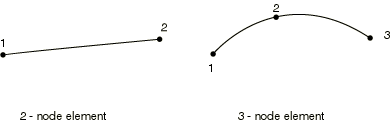
<p><img src="/uploads/images/2018/2018-10-02-beam-elements-in-abaqus-1.png" alt="" width="391" /></p>

<p>For beams in space an additional node may be given after a beam element’s connectivity (in the element definition—see <a href="https://www.sharcnet.ca/Software/Abaqus/6.14.2/v6.14/books/usb/pt01ch02s02aus11.html">“Element definition,” Section 2.2.1</a>) to define the approximate direction of the first cross-section axis, <strong>n</strong>₁. See <a href="https://www.sharcnet.ca/Software/Abaqus/6.14.2/v6.14/books/usb/pt06ch29s03alm09.html">“Beam element cross-section orientation,” Section 29.3.4</a>, for details.</p>

<p><strong>Numbering of integration points for output</strong></p>

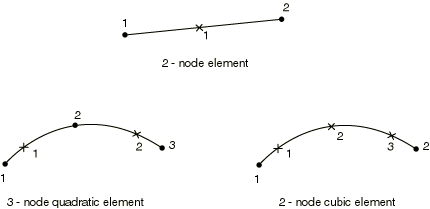
<p><img src="/uploads/images/2018/2018-10-02-beam-elements-in-abaqus-2.png" alt="" width="430" /></p>

<p><strong>Choosing the beam elements</strong></p>

<ul>
  <li>In the simulation with contacts, the first-order beam element including shear effects B21 and B31 are preferred.</li>
  <li>When the transverse shear effects are not ignorable, the Timoshenko beam elements should be used.</li>
  <li>When the structure has either very large or very small stiffness, the hybrid beam elements (B31H, B32H etc.) should be adopted in the analysis with geometrical nonlinearity.</li>
  <li>The third-order Euler-Bernoulli beam elements (B23, B33) have high precision for the simulation of beams with distributed loads, such as the dynamic vibration analysis.</li>
</ul>

<p><strong>Stress and other tensors</strong> (including strain tensors) are available for elements with displacement degrees of freedom. All tensors, except for meshed sections, have the same components. For example, the stress components are as follows:</p>

<table>
  <thead>
    <tr>
      <th> </th>
      <th> </th>
    </tr>
  </thead>
  <tbody>
    <tr>
      <td>S11</td>
      <td>Axial stress.</td>
    </tr>
    <tr>
      <td>S22</td>
      <td>Hoop stress (available only for pipe elements).</td>
    </tr>
    <tr>
      <td>S33</td>
      <td>Radial stress (available only for thick-walled pipe elements).</td>
    </tr>
    <tr>
      <td>S12</td>
      <td>Shear stress caused by torsion (available only for beam-type elements in space). This component is not available when thin-walled, open sections are employed (I-section, L-section, and arbitrary open section).</td>
    </tr>
  </tbody>
</table>

<p><strong>Stress and strain for section points for meshed sections</strong></p>

<table>
  <thead>
    <tr>
      <th> </th>
      <th> </th>
    </tr>
  </thead>
  <tbody>
    <tr>
      <td>S11</td>
      <td>Axial stress.</td>
    </tr>
    <tr>
      <td>S12</td>
      <td>Shear stress along the second cross-section axis caused by shear force and, for beam elements in space, torsion.</td>
    </tr>
    <tr>
      <td>S13</td>
      <td>Shear stress along the first cross-section axis caused by shear force and torsion (available only for beams in space).</td>
    </tr>
  </tbody>
</table>

<p><strong>Section forces, moments, and transverse shear forces</strong></p>

<table>
  <thead>
    <tr>
      <th> </th>
      <th> </th>
    </tr>
  </thead>
  <tbody>
    <tr>
      <td>SF1</td>
      <td>Axial force.</td>
    </tr>
    <tr>
      <td>SF2</td>
      <td>Transverse shear force in the local 2-direction (not available for B23, B23H, B33, B33H).</td>
    </tr>
    <tr>
      <td>SF3</td>
      <td>Transverse shear force in the local 1-direction (available only for beams in space, not available for B33, B33H).</td>
    </tr>
    <tr>
      <td>SM1</td>
      <td>Bending moment about the local 1-axis.</td>
    </tr>
    <tr>
      <td>SM2</td>
      <td>Bending moment about the local 2-axis (available only for beams in space).</td>
    </tr>
    <tr>
      <td>SM3</td>
      <td>Twisting moment about the beam axis (available only for beams in space).</td>
    </tr>
    <tr>
      <td>BIMOM</td>
      <td>Bimoment due to warping (available only for open-section beams in space).</td>
    </tr>
    <tr>
      <td>ESF1</td>
      <td>Effective axial force for beams subjected to pressure loading (available for all Abaqus/Standard stress/displacement analysis types except response spectrum and random response).</td>
    </tr>
  </tbody>
</table>

<p><strong>Section strains, curvatures, and transverse shear strains</strong></p>

<table>
  <thead>
    <tr>
      <th> </th>
      <th> </th>
    </tr>
  </thead>
  <tbody>
    <tr>
      <td>SE1</td>
      <td>Axial strain.</td>
    </tr>
    <tr>
      <td>SE2</td>
      <td>Transverse shear strain in the local 2-direction (not available for B23, B23H, B33, and B33H).</td>
    </tr>
    <tr>
      <td>SE3</td>
      <td>Transverse shear strain in the local 1-direction (available only for beams in space, not available for B33 and B33H).</td>
    </tr>
    <tr>
      <td>SK1</td>
      <td>Curvature change about the local 1-axis.</td>
    </tr>
    <tr>
      <td>SK2</td>
      <td>Curvature change about the local 2-axis (available only for beams in space).</td>
    </tr>
    <tr>
      <td>SK3</td>
      <td>Twist of the beam (available only for beams in space).</td>
    </tr>
    <tr>
      <td>BICURV</td>
      <td>Bicurvature due to warping (available only for open-section beams in space).</td>
    </tr>
  </tbody>
</table>

<h2 id="beam-cross-section-library">Beam cross section library</h2>

<p>The Abaqus beam cross-section library contains solid sections (circular, rectangular, and trapezoidal), closed thin-walled sections (box, hexagonal, and pipe), open thin-walled sections (I-shaped, T-shaped, or L-shaped), and a thick-walled pipe section. Abaqus also provides an arbitrary thin-walled section definition; Abaqus will treat this section type as a closed or open section, depending on how the section is defined.</p>

<p>Trapezoidal, I, and arbitrary library sections allow you to define the <strong>location of the origin</strong> of the local coordinate system. Other section types—such as rectangular, circular, L, or pipe—have preset origins.</p>

<h3 id="generalized-cross-section">Generalized cross section</h3>

<p>You can specify “generalized” cross-sections by specifying the geometric quantities necessary to define the section. Such generalized sections can be <strong>used only with linear material behavior</strong> although the <strong>section response can be linear or nonlinear</strong>. Nonlinear generalized cross-sections are not supported in ABAQUS/CAE.</p>

<p>*Beam General Section, section=GENERAL<br />
*Beam General Section, section=NONLINEAR GENERAL</p>

<p>A general beam section:</p>

<ul>
  <li>is used to define beam section properties that are computed once and held <strong>constant</strong> for the entire analysis;</li>
  <li>can be used to define linear or nonlinear section behavior;</li>
  <li>for linear section behavior can be associated <strong>only with linear material</strong> behavior</li>
  <li>enables the use of meshed cross-sections (<a href="http://abaqus.software.polimi.it/v6.14/books/usb/pt04ch10s06at35.html">“Meshed beam cross-sections,” Section 10.6.1</a>);</li>
  <li>enables the use of tapered cross-sections (Abaqus/Standard only).</li>
</ul>

<p>In ABAQUS/CAE, you can define a beam section with generalized shape shown as below. The section geometry properties can be defined in this dialog window. The location of the centroid and shear center, the output points as well as the transverse shear stiffness are allowed to define directly as figured below. The keywords generated in input file are listed below.</p>

<p><img src="/uploads/images/2018/2018-10-02-beam-elements-in-abaqus-3.png" alt="" width="394" /></p>

<p><img src="/uploads/images/2018/2018-10-02-beam-elements-in-abaqus-4.png" alt="" width="476" /></p>

<div class="language-plaintext highlighter-rouge"><div class="highlight"><pre class="highlight"><code>** Section: pipe Profile: Profile-2

*Beam General Section, elset=_PickedSet2, poisson = 0.2, section=GENERAL
0.00531, 2.96e-05, 0., 2.96e-05, 5.92e-05
0.,0.,-1.
2e+08, 7.69231e+07

*Shear Center
0.002, 0.001

*Centroid
0.002, 0.001

*Section Points
0.002, 0.001, 0.001, 0.

*Transverse Shear
6.9591e+06, 6.9591e+06, 0.2
</code></pre></div></div>

<p>The <strong>Section Poisson value</strong> must be between -1.0 and 0.5 with a default value set to 0.0 so that this effect is ignored. This value is only valid for the shear flexible elements providing for a possible uniform cross-sectional area change. This effect is <strong>considered only in geometrically nonlinear analysis</strong> (see <a href="http://abaqus.software.polimi.it/v6.14/books/usb/pt03ch06s01abo05.html">“Defining an analysis,” Section 6.1.2</a>) and is provided to model the reduction or increase in the cross-sectional area for a beam subjected to <strong>large axial stretch</strong>. Setting the effective Poisson’s ratio to <strong>0.5</strong> implies that the overall response of the section is <strong>incompressible</strong>. This behavior is appropriate if the beam is made of rubber or if it is made of a typical metal whose overall response at large deformation is essentially incompressible (because it is dominated by plasticity). Values between 0.0 and 0.5 mean that the cross-sectional area changes proportionally between no change and incompressibility, respectively. A negative value of the effective Poisson’s ratio will result in an increase in the cross-sectional area in response to tensile axial strains. <em>Why the cross section area increases under tensile axial strain?</em></p>

<p>If you want to get the stress and strain on <strong>integration points</strong>, you have to define the output points in “Edit Beam Section”. To locate points in the section at which output of axial strain (and, for linear section behavior, axial stress) is required, specify the local \(\left( {{x_1},{x_2}} \right)\) coordinates of the point in the cross-section: Abaqus numbers the points 1, 2, … in the order that they are given.</p>

<p>The variation of \(\varepsilon\) over the section is given by</p>

\[\varepsilon = {\varepsilon _c} + {\kappa _1}\left( {{x_2} - {x_{2c}}} \right) - {\kappa _2}\left( {{x_1} - {x_{1c}}} \right)\]

<p>where \(\left( {{x_{1c}},{x_{2c}}} \right)\) are the local coordinates of the centroid of the beam section and \({\kappa _1}\) and \({\kappa _2}\) are the changes of curvature for the section.</p>

<h3 id="meshed-cross-section">Meshed cross section</h3>

<p>The response of some structures is beam-like, yet the beam cross-section geometry or multi-material makeup of the cross-section do not permit the use of a predefined library beam cross-section. In these cases a meshed cross-section can be used to model the beam cross-section and to generate beam cross-section properties appropriate for subsequent use in a Timoshenko beam analysis. The beam properties are generated assuming a <strong>thick-walled (solid) cross-section with unconstrained out-of-plane warping</strong>, so open-section beam elements cannot use the beam cross-section properties generated from the meshed section. The generated beam cross-section properties include axial, bending, torsional, and <strong>transverse shear stiffnesses</strong>; mass, rotary inertia, and damping properties; and the centroid and shear center of the cross-section. In addition, the equivalent beam cross-section properties include information on stress recovery, such as the warping function and its derivatives.</p>

<p>Meshed cross-sections:</p>

<ul>
  <li>allow for the description of a beam cross-section including multiple materials and complex geometry;</li>
  <li>are meshed in Abaqus/Standard with two-dimensional warping elements, which have an out-of-plane warping displacement as the only degree of freedom;</li>
  <li>generate beam cross-section properties that can be used in a subsequent beam element analysis in either Abaqus/Standard or Abaqus/Explicit;</li>
  <li>allow <strong>only isotropic linear elastic material</strong> behavior or <strong>orthotropic linear elastic material</strong> behavior for warping elements;</li>
  <li>allow stress and strain postprocessing on the beam element model or the two-dimensional warping element model.</li>
</ul>

<p>The procedure for analyzing and postprocessing a beam analysis using a meshed cross-section is as follows:</p>

<ol>
  <li>Mesh and analyze a two-dimensional Abaqus/Standard model of the beam cross-section.</li>
  <li>Use the generated cross-sectional properties in an Abaqus/Standard or Abaqus/Explicit beam analysis.</li>
  <li>Using the beam analysis results, postprocess from the beam model or the two-dimensional cross-section model.</li>
</ol>

<p>The cross-section is meshed using special-purpose two-dimensional elements: <strong>WARP2D3</strong> (3-node triangular) and <strong>WARP2D4</strong> (4-node quadrilateral). These elements have one degree of freedom per node representing the value of the out-of-plane warping function and use a solid section definition. The way to generate and use the generated cross section properties is detailed in <a href="https://www.sharcnet.ca/Software/Abaqus/6.14.2/v6.14/books/usb/default.htm?startat=pt04ch10s06at35.html">Abaqus Analysis User’s Guide</a>.</p>

<h3 id="keywords-edition">Keywords edition</h3>

<p>The keywords in input files for general section and meshed cross section can be referred to <a href="https://www.sharcnet.ca/Software/Abaqus/6.14.2/v6.14/books/key/default.htm?startat=ch02abk05.html#usb-kws-mbeamgensect">Abaqus Keywords Reference Guide</a> and summarized here.</p>

<blockquote>
  <p>*Beam General Section, elset=<em>elset_name</em>, section=GENERAL<br />
<em>A</em>, \({I_{11}}\), \({I_{12}}\), \({I_{22}}\), <em>J</em>, \({\Gamma _0}\), \({\Gamma _W}\)<br />
0, 0, -1 (optional)<br />
<em>E</em>, <em>G</em></p>

  <p>*Beam General Section, elset=<em>elset_name</em>, section=NONLINEAR GENERAL<br />
<em>A</em>, \({I_{11}}\), \({I_{12}}\), \({I_{22}}\), <em>J</em>, \({\Gamma _0}\), \({\Gamma _W}\)<br />
0, 0, -1 (optional)<br />
<em>E</em>, <em>G</em><br />
The axial and bending behaviors of the section are defined by using the <a href="https://www.sharcnet.ca/Software/Abaqus/6.14.2/v6.14/books/key/ch01abk16.html">*AXIAL</a>, <a href="https://www.sharcnet.ca/Software/Abaqus/6.14.2/v6.14/books/key/ch13abk32.html">*M1</a>, <a href="https://www.sharcnet.ca/Software/Abaqus/6.14.2/v6.14/books/key/ch13abk33.html">*M2</a>, <a href="https://www.sharcnet.ca/Software/Abaqus/6.14.2/v6.14/books/key/ch19abk08.html">*TORQUE</a>, and <a href="https://www.sharcnet.ca/Software/Abaqus/6.14.2/v6.14/books/key/ch19abk05.html">*THERMAL EXPANSION</a> options.</p>

  <p>*Beam General Section, elset=<em>elset_name</em>, section=MESHED<br />
0, 0, -1<br />
(<em>EA</em>), \({\left( {EI} \right)_{11}}\), \({\left( {EI} \right)_{12}}\), \({\left( {EI} \right)_{22}}\), (<em>GJ</em>)<br />
\(\rho A\), \({\left( {\rho I} \right)_{11}}\), \({\left( {\rho I} \right)_{12}}\), \({\left( {\rho I} \right)_{22}}\), \({x_{1cm}}\), \({x_{2cm}}\)</p>
</blockquote>

<p>Notes: (1) Sectorial moment \({\Gamma _0}\) and warping constant \({\Gamma _W}\) are only needed in ABAQUS/Standard when the section is associated with open=section beam elements. (2) (0, 0, -1) are the default values for beam orientation if the first beam section axis is not defined by an additional node in the element’s connectivity. (3) If the TAPER parameter is included, two lines of properties of node A and node B are required. (4) \({x_{1cm}}\) and \({x_{2cm}}\) are the local 1-coordinate and 2-coordinate of the center of mass.</p>

<h2 id="example-of-different-section-settings">Example of different section settings</h2>

<p>A steel frame with pipe section is analyzed with different section settings with beam element B31. Displacement control method with a maximum vertical displacement 1m at the vertex of the frame is adopted. The pipe section has a diameter of 219.1mm and thickness of 8mm. The material possesses density of 77 and elastic module of 200GPa and the poison ratio of 0.3.</p>

<p>The transverse shear stiffness are specified. The keywords in input file are listed below.</p>

<div class="language-plaintext highlighter-rouge"><div class="highlight"><pre class="highlight"><code>*Beam Section, elset=_PickedSet2, material=pipe, section=THICK PIPE
0.10955, 0.008
0.,0.,-1.
*Transverse Shear
204059, 204059,
</code></pre></div></div>

<div class="language-plaintext highlighter-rouge"><div class="highlight"><pre class="highlight"><code>*Beam General Section, elset=_PickedSet2, section=GENERAL
0.00531, 2.96e-05, 0., 2.96e-05, 5.92e-05
0.,0.,-1.
2e+08, 7.69231e+07
*Transverse Shear
204059, 204059,
</code></pre></div></div>

<div class="language-plaintext highlighter-rouge"><div class="highlight"><pre class="highlight"><code>*Beam General Section, elset=_PickedSet2,section=MESHED
0.,0.,-1.
1.06E+06,5.92E+03,0.00E+00,5.92E+03,4.55E+03
8.18E+07 ,4.56E+05,0.00E+00,4.56E+05,0,0

*Transverse Shear
204059,204059,0
</code></pre></div></div>

<div class="language-plaintext highlighter-rouge"><div class="highlight"><pre class="highlight"><code>*Beam General Section, elset=_PickedSet2, section=PIPE
0.10955, 0.008
0.,0.,-1.
2e+08, 7.69231e+07

*Transverse Shear
204059, 204059,
</code></pre></div></div>

<p>The force-displacement curves of the vertex are illustrated in the following figure and accord well with each other.</p>

<p><img src="/uploads/images/2018/2018-10-02-beam-elements-in-abaqus-5.png" alt="" width="577" /></p>

<p><strong>Notes:</strong></p>

<ul>
  <li>The choice of section integration for generalized section beam can only be “Before analysis”.</li>
  <li>only thin-walled pipe section can be used in general section with keywords in input file.</li>
</ul>

<div class="archived-comments">
<h3>6 Comments</h3>
<p class="archived-comments-note">These comments were left on the original WordPress version of this blog.</p>
<ol class="archived-comment-list">
<li class="archived-comment">
<div class="archived-comment-meta"><strong>читы cs go</strong> <span>May 12, 2019 at 10:35</span></div>
<div class="archived-comment-body"><p>Thank you for another fantastic article. Where else could anybody get that type of information in such an ideal way of writing? I have a presentation next week, and I’m on the look for such information.</p></div>
</li>
<li class="archived-comment">
<div class="archived-comment-meta"><strong>Jannik</strong> <span>November 12, 2020 at 17:22</span></div>
<div class="archived-comment-body"><p>Hi Dorothy,<br />
thank you very much for this article!<br />
Kind regards<br />
Jannik</p></div>
</li>
<li class="archived-comment">
<div class="archived-comment-meta"><strong>Alhasan</strong> <span>April 12, 2022 at 11:57</span></div>
<div class="archived-comment-body"><p>Hello,</p><p>Thank you so much for this, But I would like you to know that some of the image links in this article are broken and are no longer active?<br />
Could this be remedied, or the images replaced?</p><p>Thank you,<br />
Alhasan</p></div>
<ol class="archived-comment-children"><li class="archived-comment">
<div class="archived-comment-meta"><strong>Dorothy</strong> <span>April 13, 2022 at 00:45</span></div>
<div class="archived-comment-body"><p>Hi Alhasan,<br />
Thank you so much. The images work now.<br />
Best,<br />
Dorothy</p></div>
<ol class="archived-comment-children"><li class="archived-comment">
<div class="archived-comment-meta"><strong>Alhasan</strong> <span>April 14, 2022 at 04:55</span></div>
<div class="archived-comment-body"><p>Thank you so much. 🙂</p></div>
</li></ol>
</li></ol>
</li>
<li class="archived-comment">
<div class="archived-comment-meta"><strong>Estef H</strong> <span>July 20, 2023 at 15:25</span></div>
<div class="archived-comment-body"><p>Hi Dorothy,</p><p>Thank you for this amazing explanation!</p></div>
</li>
</ol>
</div>]]></content><author><name>Dorothy</name></author><category term="ABAQUS" /><summary type="html"><![CDATA[Beam elements in ABAQUS make me a little confused, especially about the shear stiffness and elements for open sections. In this post, I want to make a summary of the elements in ABAQUS and give an example about the settings of beam elements. Beam element library Beam elements in a plane only have active degrees of freedom 1, 2, 6. Beam elements in space have active degrees of freedom 1, 2, 3, 4, 5, 6. Open section beams in space B31OS, B31OSH, B32OS, B32OSH have active degrees of freedom 1, 2, 3, 4, 5, 6, 7. The beam elements in ABAQUS Standard and Explicit (v6.14) are summarized below.]]></summary></entry><entry><title type="html">Examples of extracting matrices from ABAQUS</title><link href="https://dorothydingzx.github.io/archives/examples-of-extracting-matrices-from-abaqus.html" rel="alternate" type="text/html" title="Examples of extracting matrices from ABAQUS" /><published>2018-07-17T15:26:19+00:00</published><updated>2018-07-17T15:26:19+00:00</updated><id>https://dorothydingzx.github.io/archives/examples-of-extracting-matrices-from-abaqus</id><content type="html" xml:base="https://dorothydingzx.github.io/archives/examples-of-extracting-matrices-from-abaqus.html"><![CDATA[<h2 id="2d-frame">2D frame</h2>

<p>This is a plane steel frame with box sections subjected to a point load at one node figured as below.</p>

<p><img src="/uploads/images/2018/2018-07-17-examples-of-extracting-matrices-from-abaqus-1.png" alt="extract matrix example2" width="452" /></p>

<p>An dynamic implicit analysis step was defined and the following lines were added at the end of input file.</p>

<pre><code class="language-null">**
*STEP
*MATRIX GENERATE, STIFFNESS, MASS, LOAD, Structural Damping,Viscous Damping
*MATRIX OUTPUT, STIFFNESS, MASS, LOAD, Structural Damping,Viscous Damping, FORMAT=COORDINATE
*END STEP
</code></pre>

<!-- more -->

<p>After the analysis completed, the Data file will be available and a screen shoot is provided below. The <em>.mtx</em> files are generated in the file folder, however, there is no <em>dyimp_LOAD2.mtx</em> file and this is a problem remained. I still don’t know how to fix it.</p>

<p><img src="/uploads/images/2018/2018-07-17-examples-of-extracting-matrices-from-abaqus-2.png" alt="extract matrix example1" width="645" /></p>

<h2 id="3d-frame">3D frame</h2>

<p>This is a 3D frame with rectangular sections subjected to two point loads. Firstly, the columns and beams were built, then they are assembled in ASSEMBLY section and finally I used the merge function and suppressed the original instances to form this frame. I also chose the Remove button to for the intersecting boundaries. The masses were applied on the nodes and as such the material density was set to zero. A dynamic implicit analysis case was defined and one element per member is used.</p>

<p><img src="/uploads/images/2018/2018-07-17-examples-of-extracting-matrices-from-abaqus-3.png" alt="3D frame matrix" width="463" /></p>

<p>The same as the example of 2D frame, the codes were added to extract matrices from abaqus. The matrices were written in corresponding files.</p>

<p>However, I found the size of matrices are not consistent with the number of nodes. There are 16 nodes in this frame and the degree of freedom is 16*6=96, but the size of matrices are 144*144 and this is puzzling. To find out the reason of this, I re-extracted the matrices in coordinate form and defined a frequency step to output the element matrices. Also, I checked the numbers of nodes and elements in MESH section as follow.</p>

<p><img src="/uploads/images/2018/2018-07-17-examples-of-extracting-matrices-from-abaqus-4.png" alt="3D frame matrix numbers" width="518" /></p>

<p>From the numbers in MESH section, there is no error in it. The matrices in Coordinate form show that both the row and column labels have <strong>negative values</strong>. The numbers are from -24 to +16 and the negative part is very confusing. The 24 negative numbers are the geometrical nodes (3*4*2) as I understand. However, why these degree of freedoms are not condensed is unknown, probably there is no defined restrains in INTERACTION section. The element matrices file shows there are totally 24 elements in the model and this result correspond with the structure.</p>

<p>From these results, it can be concluded that the negative numbers are from the assembling of global matrices. I guess this may result from the merge of beams and columns. Thus, I built another frame with Tie constrains on the nodes at the same position. The numbers in MESH section is illustrated as below.</p>

<p><img src="/uploads/images/2018/2018-07-17-examples-of-extracting-matrices-from-abaqus-5.png" alt="3D frame matrix numbers2.png" width="484" /></p>

<p>It can be seen that every column has 4 nodes and every beam has 2, the sum is 40 nodes. In the matrices in coordinate form, the number of nodes is from 1 to 40, corresponding to total number of nodes. In the matrices in matrix input form, the maximum number of row and column labels is 96, equals to 16*6, meaning the nodes at the same position are condensed to one in global matrix because of the Tie constrains.</p>

<p>One more question, the matrix in matrix input form has more non-zero elements (1504) than matrix in coordinate form (800). This condition also exsists in the last model in this example and 2D frame example (12 nodes, 828 elements for coordinate form and 450 elements for matrix input form). In this example, there are 16 nodes after the condensation of degree of freedoms, so there will be 16*6=96 rows and lines, that is 96*96=9216 elements in the matrix. The number of non-zero elements in matrix in coordinate form except the diagonal part is 1504-96=1408. Half of the non-zero elements except the diagonal (1480/2=704) plus the the diagonal part (96) is the number of elements in matrix in matrix input form. The conclusion is that the matrix in matrix input form omits the symmetrical part of elements as you can fill in them according to the symmetry principle with the node numbers and degree of freedom numbers.</p>

<p>The six degree of freedoms of nodes 25, 29, 33, 37 (four button nodes) are set to be a very large value 1.0E+36 in stiffness matrix in matrix input form, and the value of row and column labels 1~6, 25~30, 49~54, 73~78 are also 1.0E+36 in stiffness matrix in coordinate form. The assembling of global is not according to the sequence of node numbers.</p>

<p>Up to now, I haven’t found any explanations in official support documents about the negative node number. If you want to extract the matrices from abaqus and use them in other software, you’d better establish the model in the second way in this example I think.</p>

<h2 id="updated-2018824">Updated 2018/8/24</h2>

<h2 id="exporting-the-load-vectors">Exporting the load vectors</h2>

<p>Section 10.3.1 in <a href="http://abaqus.software.polimi.it/v6.14/books/usb/default.htm">Abaqus Analysis User’s Guide</a></p>

<p>All types of loads can be applied in the load cases for a matrix generation step. Real and imaginary parts of the load vectors will be generated for the complex loads. Any loads that are defined in a matrix generation step will not be used in subsequent general analysis steps (unless they are respecified).</p>

<p>So, in the matrix generation step, we need to define the load again and the load matrix can be exported to <em>.mtx</em> file. The codes for exporting matrices in input file is described below.</p>

<div class="language-plaintext highlighter-rouge"><div class="highlight"><pre class="highlight"><code>*STEP
*MATRIX GENERATE, STIFFNESS, MASS, LOAD, Structural Damping,Viscous Damping
*MATRIX OUTPUT, STIFFNESS, MASS, LOAD, Structural Damping,Viscous Damping, FORMAT=COORDINATE
** LOADS
**
** Name: Load-1 Type: Concentrated force
*Cload, amplitude=Amp-1
_PickedSet79, 1, 100.
**
**
*END STEP
</code></pre></div></div>

<p>The vector in <em>LOAD.mxt</em> file is listed as</p>

<div class="language-plaintext highlighter-rouge"><div class="highlight"><pre class="highlight"><code>** Assembled nodal loads
*CLOAD, REAL
19 9.999999999999999e-35
67 9.999999999999999e-35
</code></pre></div></div>

<h2 id="updated-20190106">Updated 2019/01/06</h2>

<h2 id="negative-values-in-row-and-column-labels-in-matrix">Negative values in row and column labels in matrix</h2>

<p>I found the reason for negative values in row and column labels in matrix yesterday and tried to check this out this morning. The reason for this phenomenon lies on the method of merge. Three methods, geometry, mesh and both, are included in ABAQUS, as shown below.</p>

<p><img src="/uploads/images/2018/2018-07-17-examples-of-extracting-matrices-from-abaqus-6.png" alt="" width="528" /></p>

<p>In the first method, Geometry, only the intersecting boundaries are removed and the duplicate nodes are also removed. In the second method, Mesh, the duplicated elements as well as the nodes can be removed. A prompt message will emerge “The nodes highlighted in magenta will be merged. OK to merge?” The matrix exacted by this method do not contain row and column labels with negative values.</p>

<p>Since I cannot find the original model and codes, I tried to merge the model with the two methods and found the matrix of them do not contain negative values either. The negative value I got before might be the result of forgetting to choose Remove intersecting boundaries.</p>

<p>To sum up, if you do not want to have negative rows and columns, you can use INTERACTION (such as tie, MPC) to deal with the nodes of elements or you can merge with Geometry or Mesh and remember to choose to remove the duplicate nodes. When you merge with Geometry and retain the intersecting boundaries, negative values will be generated in the matrix.</p>

<p>22.3051776114.1776384</p>

<div class="archived-comments">
<h3>6 Comments</h3>
<p class="archived-comments-note">These comments were left on the original WordPress version of this blog.</p>
<ol class="archived-comment-list">
<li class="archived-comment">
<div class="archived-comment-meta"><strong>Nico</strong> <span>June 7, 2021 at 15:42</span></div>
<div class="archived-comment-body"><p>Hi Dorothy,</p><p>I think this post goes in the direction of my problem.<br />
I have created a beam with a fixed restraint and deposited steel as material model. Works great. For a student research project I need the mass and stiffness matrices for a body that consists of a hyperelastic model. The instructions for exporting the matrices also work for this.<br />
The only problem is that at the beginning a number of entries is zero. As an example: A beam consists of 53 nodes, so I get in the TXT file for the mass matrix in the format(coordinate) 424 entries, of which they are the first 106 entries zero, so<br />
1 1 0<br />
2 2 0<br />
.<br />
.<br />
.<br />
106 106 0<br />
After that, the entries are shifting from zero, so in the end there are 318 entries different from zero (53 nodes a 6 degrees of freedom = 318 entries). So that the entries subsequently look as follows:</p><p>107 107 x<br />
.<br />
.<br />
.<br />
424 424 y<br />
My question now is, what do the first 106 entries in which there is a zero mean? The mass and stiffness matrix is to be read into MatLab afterwards. Only zeros on the main diagonal are not advantageous, if the matrix has to be inverted. As element type currently C3D4H is used.<br />
I hope someone has a tip. Thanks a lot !<br />
Greetings<br />
Zemos</p></div>
<ol class="archived-comment-children"><li class="archived-comment">
<div class="archived-comment-meta"><strong>Dorothy</strong> <span>June 11, 2021 at 09:47</span></div>
<div class="archived-comment-body"><p>Hi Nico,<br />
Sorry about late reply, I was focusing on my qualifying exams. I did not use C3D4H element before and am not sure what are the zeros. I would suggest to output the matrices in matrix input format <code>FORMAT=MATRIX INPUT</code>, and then you will know where the zeros locate, at which node and which dof. Hope this helps.</p></div>
</li>
<li class="archived-comment">
<div class="archived-comment-meta"><strong>Sebastian</strong> <span>November 19, 2021 at 20:20</span></div>
<div class="archived-comment-body"><p>Hi Nico,<br />
i have the same problem with my results. Did you found a solution to that ?<br />
Best, Sebastian</p></div>
</li></ol>
</li>
<li class="archived-comment">
<div class="archived-comment-meta"><strong>Daniel</strong> <span>December 13, 2022 at 22:04</span></div>
<div class="archived-comment-body"><p>Hi, Dorothy. Thanks for your job. Buut do you know how to export the Jacobian (ddsdde) of the specified integration point?  I may need to have a check of the ddsdde.<br />
Regards, Daniel</p></div>
</li>
<li class="archived-comment">
<div class="archived-comment-meta"><strong>aaron cheng</strong> <span>January 27, 2023 at 14:49</span></div>
<div class="archived-comment-body"><p>Hi Dorothy,</p><p>Your post helped me a lot. but, I still got negative nodes in mtx.file. my model was a simple cube under vertical load, there is no contact happening here. is there a reason why I got negative nodes? do you know have to fix this one? looking forward to your reply.</p><p>Best, Aaron</p></div>
<ol class="archived-comment-children"><li class="archived-comment">
<div class="archived-comment-meta"><strong>Dorothy</strong> <span>June 20, 2023 at 04:12</span></div>
<div class="archived-comment-body"><p>Hi Aaron,<br />
I got negative values in the matrix probably because I forgot to choose Remove intersecting boundaries. But I cannot verify this since I lost the original model and script.<br />
Which merge method did you use when establish your model? You may try to rebuild the model to see if there are any negative values.<br />
Hope this helps.<br />
Best,<br />
Dorothy</p></div>
</li></ol>
</li>
</ol>
</div>]]></content><author><name>Dorothy</name></author><category term="ABAQUS" /><summary type="html"><![CDATA[2D frame This is a plane steel frame with box sections subjected to a point load at one node figured as below. An dynamic implicit analysis step was defined and the following lines were added at the end of input file. ** *STEP *MATRIX GENERATE, STIFFNESS, MASS, LOAD, Structural Damping,Viscous Damping *MATRIX OUTPUT, STIFFNESS, MASS, LOAD, Structural Damping,Viscous Damping, FORMAT=COORDINATE *END STEP]]></summary></entry></feed>